Making the cloud more accessible with Chrome and Android

If you’re a blind or low-vision user, you know that working in the cloud poses unique challenges. Our accessibility team had an opportunity to address some of those challenges at the 28th annual CSUN International Technology and Persons with Disabilities Conference this week. While there, we led a workshop on how we’ve been improving the accessibility of Google technologies. For all those who weren’t at the conference, we want to share just a few of those improvements and updates:

Chrome and Google Apps
  • Chrome OS now supports a high-quality text-to-speech voice (starting with U.S. English). We’ve also made spoken feedback, along with screen magnification and high-contrast mode available out-of-the-box to make Chromebook and Chromebox setup easier for users with accessibility needs.
  • Gmail now has a consistent navigation interface, backed by HTML5 ARIA, which enables blind and low-vision users to effectively navigate using a set of keyboard commands.
  • It’s now much easier to access content in your Google Drive using a keyboard—for example, you can navigate a list of files with just the arrow keys. In Docs, you can access features using the keyboard, with a new way to search menu and toolbar options. New keyboard shortcuts and verbalization improvements also make it easier to use Docs, Sheets and Slides with a screenreader.
  • The latest stable version of Chrome, released last week, includes support for the Web Speech API, which developers can use to integrate speech recognition capabilities into their apps. At CSUN, our friends from Bookshare demonstrated how they use this new functionality to deliver ReadNow—a fully integrated ebook reader for users with print disabilities.
  • Finally, we released a new Help Center Guide specifically for blind and low-vision users to ease the transition to using Google Apps.

Android
  • We added Braille support to Android 4.1; since then, Braille support has been expanded on Google Drive for Android, making it easier to read and edit your documents. You can also use Talkback with Docs and Sheets to edit on the go.
  • With Gesture Mode in Android 4.1, you can reliably navigate the UI using touch and swipe gestures in combination with speech output.
  • Screen magnification is now built into Android 4.2—just enable “Magnification gestures,” then triple tap to enter full screen magnification.
  • The latest release of TalkBack (available on Play soon) includes several highly-requested features like structured browsing of web content and the ability to easily suspend/resume TalkBack via an easy-to-use radial menu.

These updates to Chrome, Google Apps, and Android will help create a better overall experience for our blind and low-vision users, but there’s still room for improvement. Looking ahead, we’re focused on the use of accessibility APIs that will make it easier for third-party developers to create accessible web applications, as well as pushing the state of the art forward with technologies like speech recognition and text-to-speech. We’re looking forward to working with the rest of the industry to make computers and the web more accessible for everyone.

YouTube automatic captions now in six European languages

Captions are important to make sure everyone—including deaf, hard-of-hearing, and viewers who speak other languages—can enjoy videos on YouTube.

In 2009, you first saw a feature that automatically creates captions on YouTube videos in English, and since then we’ve added Japanese, Korean, and Spanish. Today, hundreds of millions of people speaking six more languages—German, Italian, French, Portuguese, Russian, and Dutch—will have automatic caption support for YouTube videos in those languages. Just click the closed caption button on any of these videos to see how it works:


Now in 10 languages, automatic captions are an important first step in the path toward high-quality captions for the 72 hours of video people upload per minute. As automatic captions will have some errors, creators also have several tools to improve the quality of their captions. Automatic captions can be a starting point, where creators can then download them for editing, or edit them in-line on YouTube. Creators can also upload plain-text transcripts in these languages, and the same technology will generate automatically-synchronized captions.

You now have around 200 million videos with automatic and human-created captions on YouTube, and we continue to add more each day to make YouTube accessible for all.

Hoang Nguyen, software engineer, recently watched “Completo, ilha das flores.”

Greater accessibility for Google Apps

It's been a year since we posted about enhanced accessibility in Google Docs, Sites and Calendar. As we close out another summer, we want to update our users on some of the new features and improvements in our products since then. We know that assistive technologies for the web are still evolving, and we're committed to moving the state of accessibility forward in our applications.

Since last year, we've made a number of accessibility fixes in Google Calendar, including improved focus handling, keyboard access, and navigation. In Google Drive, we incorporated Optical Character Recognition technology to allow screen readers to read text in scanned PDFs and images, and we added NVDA support for screen readers. New accessibility features in mobile apps (Gmail for Mobile and Google Drive on iOS and Android) included enhanced explore-by-touch capabilities and keyboard/trackpad navigability. For a full list of new features and improvements for accessibility in our products, check out our post today on accessible@googlegroups.com.

Based on these updates, we’ve also created an Administrator Guide to Accessibility that explains best practices for deploying Google Apps to support users’ accessibility needs. We want to give everyone a great experience with Google Apps, and this guide is another resource designed with that goal in mind.

For more information on these specific accessibility improvements, using Google products with screen readers, how to submit feedback and how to track our progress, please visit www.google.com/accessibility.

YouTube automatic captions now available in Spanish

Cross posted from the Blog de YouTube en Español

Last year, YouTube had more than 1 trillion views, or about 140 views for every person on earth. As the world tunes in to YouTube, we want everyone, in every language, to have the same opportunity to enjoy YouTube. So today, we’re expanding our language accessibility to add automatic captions in Spanish.

When a video has recognizable speech, you’ll see a “CC” button appear in the bottom of the player, which will instantly add captions of the video in Spanish. Just look for this icon and click “Transcribe Audio.”


The hundreds of millions of Spanish speakers in the world are the latest to see the auto-caption feature, adding to other available languages of English, Japanese and Korean. You’ll find auto-captions available on more than 157 million videos, with videos being added every day. We’ll continue to refine our speech recognition technology, and you can learn more about how it works here. See it in action on this video, by clicking the CC:


If you want to see YouTube videos in even more languages, you can combine auto-captions with our auto-translate feature to generate subtitles in more than 50 languages. For creators, upload a Spanish transcript with your video and we’ll automatically create timecoded captions. You can even download the automatic captions, all from your Video Manager.

We’re launching new countries and languages all the time, as we work to make YouTube accessible and enjoyable to all.

¡Nos vemos en YouTube!

Hoang Nguyen, software engineer, recently watched "Casillas: 'Si la Eurocopa hubiese sido en 2011, habría habido más problemas.'"

A look inside our 2011 diversity report

We work hard to ensure that our commitment to diversity is built into everything we do—from hiring our employees and building our company culture to running our business and developing our products, tools and services. To recap our diversity efforts in 2011, a year in which we partnered with and donated $19 million to more than 150 organizations working on advancing diversity, we created the 2011 Global Diversity & Talent Inclusion Report. Below are some highlights.

In the U.S., fewer and fewer students are graduating with computer science degrees each year, and enrollment rates are even lower for women and underrepresented groups. It’s important to grow a diverse talent pool and help develop the technologists of tomorrow who will be integral to the success of the technology industry. Here are a few of the things we did last year aimed at this goal in the U.S. and around the world:
We not only promoted diversity and inclusion outside of Google, but within Google as well.
  • We had more than 10,000 members participate in one of our 18 Global Employee Resource Groups (ERGs). Membership and reach expanded as Women@Google held the first ever Women’s Summit in both Mountain View, Calif. and Japan; the Black Googler Network (BGN) made their fourth visit to New Orleans, La., contributing 360 volunteer hours in just two days; and the Google Veterans Network partnered with GoogleServe, resulting in 250 Googlers working on nine Veteran-related projects from San Francisco to London.
  • Googlers in more than 50 offices participated in the Sum of Google, a celebration about diversity and inclusion, in their respective offices around the globe.
  • We sponsored 464 events in 70 countries to celebrate the anniversary of International Women's Day. Google.org collaborated with Women for Women International to launch the “Join me on the Bridge” campaign. Represented in 20 languages, the campaign invited people to celebrate by joining each other on bridges around the world—either physically or virtually—to show their support.
Since our early days, it’s been important to make our tools and services accessible and useful to a global array of businesses and user communities. Last year:
  • We introduced ChromeVox, a screen reader for Google Chrome, which helps people with vision impairment navigate websites. It's easy to learn and free to install as a Chrome Extension.
  • We grew Accelerate with Google to make Google’s tools, information and services more accessible and useful to underrepresented communities and diverse business partners.
  • On Veterans Day in the U.S., we launched a new platform for military veterans and their families. The Google for Veterans and Families website helps veterans and their families stay connected through products like Google+, YouTube and Google Earth.
We invite you to take a look back with us at our 2011 diversity and inclusion highlights. We’re proud of the work we’ve done so far, but also recognize that there’s much more to do to. These advances may not happen at Internet speed, but through our collective commitment and involvement, we can be a catalyst for change.

Introducing Google Drive... yes, really

Just like the Loch Ness Monster, you may have heard the rumors about Google Drive. It turns out, one of the two actually does exist.

Today, we’re introducing Google Drive—a place where you can create, share, collaborate, and keep all of your stuff. Whether you’re working with a friend on a joint research project, planning a wedding with your fiancé or tracking a budget with roommates, you can do it in Drive. You can upload and access all of your files, including videos, photos, Google Docs, PDFs and beyond.


With Google Drive, you can:
  • Create and collaborate. Google Docs is built right into Google Drive, so you can work with others in real time on documents, spreadsheets and presentations. Once you choose to share content with others, you can add and reply to comments on anything (PDF, image, video file, etc.) and receive notifications when other people comment on shared items.
  • Store everything safely and access it anywhere (especially while on the go). All your stuff is just... there. You can access your stuff from anywhere—on the web, in your home, at the office, while running errands and from all of your devices. You can install Drive on your Mac or PC and can download the Drive app to your Android phone or tablet. We’re also working hard on a Drive app for your iOS devices. And regardless of platform, blind users can access Drive with a screen reader.
  • Search everything. Search by keyword and filter by file type, owner and more. Drive can even recognize text in scanned documents using Optical Character Recognition (OCR) technology. Let’s say you upload a scanned image of an old newspaper clipping. You can search for a word from the text of the actual article. We also use image recognition so that if you drag and drop photos from your Grand Canyon trip into Drive, you can later search for [grand canyon] and photos of its gorges should pop up. This technology is still in its early stages, and we expect it to get better over time.
You can get started with 5GB of storage for free—that’s enough to store the high-res photos of your trip to the Mt. Everest, scanned copies of your grandparents’ love letters or a career’s worth of business proposals, and still have space for the novel you’re working on. You can choose to upgrade to 25GB for $2.49/month, 100GB for $4.99/month or even 1TB for $49.99/month. When you upgrade to a paid account, your Gmail account storage will also expand to 25GB.


Drive is built to work seamlessly with your overall Google experience. You can attach photos from Drive to posts in Google+, and soon you’ll be able to attach stuff from Drive directly to emails in Gmail. Drive is also an open platform, so we’re working with many third-party developers so you can do things like send faxes, edit videos and create website mockups directly from Drive. To install these apps, visit the Chrome Web Store—and look out for even more useful apps in the future.

This is just the beginning for Google Drive; there’s a lot more to come.

Get started with Drive today at drive.google.com/start—and keep looking for Nessie...

Learning independence with Google Search features

Searches can become stories. Some are inspiring, some change the way we see the world and some just put a smile on our face. This is a story of how people can use Google to do something extraordinary. If you have a story, share it. - Ed.

We all have memories of the great teachers who shaped our childhood. They found ways to make the lightbulb go off in our heads, instilled in us a passion for learning and helped us realize our potential. The very best teachers were creative with the tools at their disposal, whether it was teaching the fundamentals of addition with Cheerios or the properties of carbon dioxide with baking soda and vinegar. As the Internet has developed, so too have the resources available for teachers to educate their students.

One teacher who has taken advantage of the web as an educational tool is Cheryl Oakes, a resource room teacher in Wells, Maine. She’s also been able to tailor the vast resources available on the web to each student’s ability. This approach has proven invaluable for Cheryl’s students, in particular 16-year-old Morgan, whose learning disability makes it daunting to sort through search results to find those webpages that she can comfortably read. Cheryl taught Morgan how to use the Search by Reading Level feature on Google Search, which enables Morgan to focus only on those results that are most understandable to her. To address the difficulty Morgan faces with typing, Cheryl introduced her to Voice Search, so Morgan can speak her queries into the computer. Morgan is succeeding in high school, and just registered to take her first college course this summer.


There’s a practically limitless amount of information available on the web, and with search features, you can find the content that is most meaningful for you. For more information, visit google.com/insidesearch/features.html.

Understanding accessibility at CSUN 2012

This week we’re attending the 27th annual CSUN International Technology and Persons with Disabilities Conference. As the Internet evolves, screen readers, browsers and other tools for accessibility need to grow to meet the complexity of the modern web. Conferences like CSUN are an opportunity to check in with web users with disabilities: not just to share our progress in making online technologies accessible, but to also discuss improvements for the future.

Who are these users? In August, we conducted a survey with the American Council of the Blind, to find out more about how people with sight impairment use the web. We received nearly 1,000 responses from people who are blind or visually impaired, from a wide range of professions in 57 countries: teachers, software developers, social workers, writers, psychologists, musicians and students. The results paint a picture of why it is critical to improve the accessibility of web applications. Of the respondents:
  • Almost 90 percent reported regularly using the web to keep in touch with friends and family
  • Over half use a smartphone, and over half own more than one computer
  • Over two-thirds of respondents said they use social media
  • Over 50 percent have completed a baccalaureate degree, and of those, 30 percent have gone on to to postgraduate studies at the masters' or Ph.D. level
  • Of those who are currently students, over 70 percent have their assistive technology provided for by their school
  • However, for those who have left school and are of working age, 46 percent are unemployed
Better web accessibility has the potential to increase educational and employment opportunities, provide social cohesion and enable independence for the people with disabilities. We imagine a future for the web where the most visually complex applications can be rendered flawlessly to screen readers and other assistive devices that don't rely on sight, using technologies that work seamlessly on browsers and smartphones.


[click here for audio description]

Since we last attended CSUN, we’ve made several improvements to the accessibility of our products:
If you're attending CSUN 2012, we hope you'll come up and say hello at one of our talks on the accessibility of our products, including the use of video in Google+ and Docs and accessibility on Android devices. And Friday we’ll host a Q&A Fireside chat with Google product teams. You can also try some of these improvements out at our two hands-on demo sessions on Thursday, in the Connaught breakout room:
  • 10am to 12pm—Chromebooks and new features in Google Apps
  • 1pm to 3pm—Android 4.0 Galaxy Nexus phones
If you're not attending CSUN 2012, we'd love to hear your thoughts on accessibility in our web forum.

Captions for all: more options for your viewing and reading pleasure

Since we first announced caption support in 2006, YouTube creators have uploaded more than 1.6 million videos with captions, growing steadily each year. We’ve also enabled automatic captions for 135 million videos, more than tripling the number of captioned videos available since July 2011. YouTube and Google’s video accessibility team have been hard at work, and we wanted to let you know about some of our progress over the past few months:

For YouTube viewers

More languages: We now support automatic captions and transcript synchronization in Japanese, Korean, and English. Speech recognition for those languages makes it easier for video owners to create captions from a plain transcript. Video owners can also add captions and subtitles in 155 supported languages and dialects, from Afar to Zulu. In Movies and Shows, you can even find out which subtitle languages are available before deciding to rent.


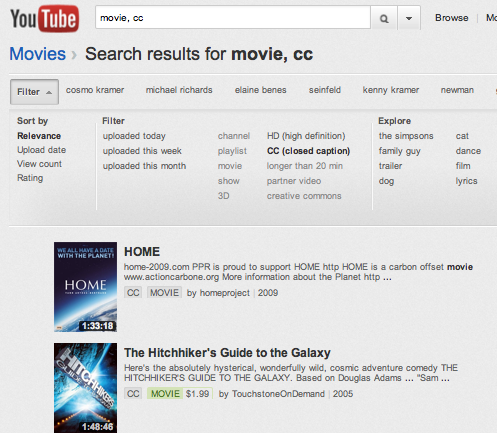
Search for videos with captions: Looking for that great quote from a video on YouTube? Add ", cc" to any search, or after searching, click Filter > CC to only see results with closed captions.


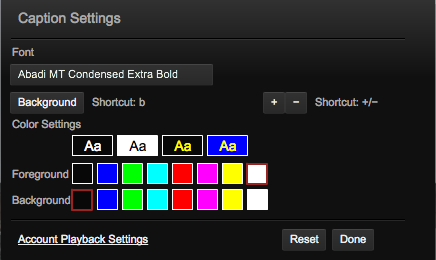
Caption settings: While watching a video, you can change the way the captions look by clicking on the “CC” icon and then the “Settings...” menu item. This includes changing the font size or colors used, and we’re planning to make this available on other platforms and add more options soon.


Broadcast caption support: If the channel owner provides a video caption file in a broadcast format, we now support its position and style information, just like you’d see on TV. This means the text can appear near the character who is speaking, italicized to indicate an off-camera narrator, or even scrolling if the original captions were generated in a real-time mode. Check out this little demo from CPC to see how it looks, or even watch a rental movie with captions like those available from The Walt Disney Studios.

For YouTube creators

More supported formats: YouTube now supports many of the common caption formats used by broadcasters, such as .SCC, .CAP, EBU-STL, and others. If you have closed captions that you created for TV or DVDs, we'll handle the conversion for you.

MPEG-2 caption import: If you upload an MPEG-2 video file that contains closed captions with CEA-608 encoding, we'll import the captions along with the video and create YouTube captions. For example, the nonprofit organization Public.Resource.Org recently added thousands of public domain videos with closed captions to YouTube, coming from government agencies like the National Archives. Here’s some insight from Carl Malamud, President, Public.Resource.Org:
Many of the DVDs and VHS tapes lying around in our vaults and attics--particularly those that were produced by governments and others that care about accessibility of their videos--already have Closed Captions embedded in them. Pulling that information out automatically and making it visible on YouTube means that these videos will continue to be accessible to new generations of viewers.


Along with the millions of people like myself who rely on captions and subtitles, we were very encouraged when the Federal Communications Commission published rules governing closed captioning requirements for video on the web, whether that’s to your computer, tablet, phone or other device. We hope these new regulations will drive captions closer to becoming ubiquitous for video everywhere, and in the meantime we’ll keep developing more ways for you to enjoy all the great channels on YouTube.

Ken Harrenstien, software engineer, recently rented “Cars 2” and was ecstatic to see its awesome captions.

Enhanced accessibility in Docs, Sites and Calendar

This fall, as classrooms fill with the hustle and bustle of a new semester, more students than ever will use Google Apps to take quizzes, write essays and talk to classmates. Yet blind students (like blind people of all ages) face a unique set of challenges on the web. Members of the blind community rely on screen readers to tell them verbally what appears on the screen. They also use keyboard shortcuts to do things that would otherwise be accomplished with a mouse, such as opening a file or highlighting text.

Over the past few months, we’ve worked closely with advocacy organizations for the blind to improve our products with more accessibility enhancements. While our work isn’t done, we’ve now significantly improved keyboard shortcuts and support for screen readers in several Google applications, including Google Docs, Google Sites and Google Calendar. Business, government and education customers can also learn more about these updates on the Enterprise blog.

In the weeks and months ahead, we’ll continue to improve our products for blind users. We believe that people who depend on assistive technologies deserve as rich and as productive an experience on the web as sighted users, and we’re working to help that become a reality.

For more information on these accessibility changes, using Google products with screen readers, how to send us feedback and how to track our progress, visit google.com/accessibility.

An accessibility survey for blind users

These days, we rely on the Internet to keep us informed and in touch, yet our experience of the web is filtered through the tools we use to access it. The devices and technologies we choose, and our decisions about when we upgrade those tools, can affect how we interact with the web and with whom we are able to communicate.


In July, I attended the annual conference held by the American Council of the Blind (ACB). I was struck by something I heard from people there: their experience using the web was very different from mine not because they were blind, but because the technology and web tools available to them were unlike the ones available to me, as a sighted person. While the Internet provides many benefits to modern society, it has also created a unique set of challenges for blind and low-vision users who rely on assistive technologies to use the web. We’re committed to making Google’s products more accessible, and we believe the best way to understand the accessibility needs of our users is to listen to them.


This week, we’re announcing a survey that will help us better understand computer usage and assistive technology patterns in the blind community. Over the past three months, we’ve worked closely with the ACB to develop a survey that would give us a greater understanding of how people choose and learn about the assistive technologies they use. This survey will help us design products and tools that interact more effectively with assistive technologies currently available to the blind community, as well as improve our ability to educate users about new features in our own assistive technologies, such as ChromeVox and TalkBack.


The survey will be available through mid-September on the ACB's website and by phone. We encourage anyone with a visual impairment who relies on assistive technologies to participate; your input will help us offer products that can better suit your needs. For details, visit www.acb.org/googlesurvey.


Supporting accessibility at CSUN

This week we’ll be at the 26th annual CSUN International Technology & Persons with Disabilities Conference to talk with users and accessibility experts about how to make our products more accessible to people with disabilities. We’ll also give a talk on the current state of accessibility for our products.

We’ve been working in this space for a while, launching features such as captions on YouTube, applications such as WalkyTalky and Intersection Explorer on Android (so people can use Google Maps eyes-free) and building easy-to-navigate, accessible Google search pages to work smoothly with adaptive technologies.

We have more to do. At CSUN 2011, we’re looking forward to more insights about how to make Android, Chrome and Google Apps better enabled for people who rely on assistive technologies like screen readers. If you’re attending and are interested in participating in our focus groups there, please fill out our survey by 9pm PST today, Tuesday, March 15.

To see an overview of the accessibility features of our products today, visit google.com/accessibility. We're launching an updated version of this site later today to make it easier for visitors to find information on using our products, and for developers and publishers to learn how to develop accessible products on our platforms. While you’re there, please give us feedback on what we can do better to make our products more accessible.

Honoring the 20th Anniversary of the Americans with Disabilities Act

[Cross-posted on Google Public Policy Blog

Bending, walking, breathing, hearing, seeing and sleeping are simple things that are often taken for granted, as are thinking, learning, and communicating.

Twenty years ago today, the Americans with Disabilities Act (ADA) was signed into law. This milestone legislation bans persons or companies from discriminating against anyone with limited abilities. It’s hard to imagine a world in which the right to participate in activities commonly enjoyed by the bulk of the population are denied or inadequately accommodated, but that was the case before ADA.

The efforts of the advocates who came to Washington two decades ago to rally for their civil rights has transformed so much of the modern world around us. As someone who’s worn hearing aids since I was 13, for example, I very much appreciate that most television programs and DVDs or Blu-Ray disks are captioned. On my way home, I might pass through a door that I know is wide enough for a wheelchair -- because the ADA set the building codes that require it. I see service animals on the DC Metro, accessible checkout aisles at my grocery store, ramps on sidewalks, and designated parking in movie theater lots: all there because of the important provisions included in the ADA.

Whereas the ADA set legal standards for ensuring equal rights for Americans with disabilities, Google is keenly aware that technology can help all users better enjoy the world around them. From opening millions of titles of printed content to persons with visual impairments through Google Book Search, to providing ready and easy-to-use captions on YouTube, to including a built-in screenreader and text-to-speech engine in Android, to introducing new extensions on Chrome to make online text easier to read, we’re serious about honoring our mission to make the world’s information universally accessible and useful. You can keep up with our progress at google.com/accessibility.

Congratulations to all those who work to make the ADA a living, breathing reality. For all the years I’ve been working on policy in Washington, it’s still rare to see a law that has had as positive and fundamental an influence on our lives as this Act. There still is work to be done to meet the goals of ADA, and we are committed to doing our part.

Automatic captions in YouTube

Since we first announced captions in Google Video and YouTube, we've introduced multiple caption tracks, improved search functionality and even automatic translation. Each of these features has had great personal significance to me, not only because I helped to design them, but also because I'm deaf. Today, I'm in Washington, D.C. to announce what I consider the most important and exciting milestone yet: machine-generated automatic captions.

Since the original launch of captions in our products, we’ve been happy to see growth in the number of captioned videos on our services, which now number in the hundreds of thousands. This suggests that more and more people are becoming aware of how useful captions can be. As we’ve explained in the past, captions not only help the deaf and hearing impaired, but with machine translation, they also enable people around the world to access video content in any of 51 languages. Captions can also improve search and even enable users to jump to the exact parts of the videos they're looking for.

However, like everything YouTube does, captions face a tremendous challenge of scale. Every minute, 20 hours of video are uploaded. How can we expect every video owner to spend the time and effort necessary to add captions to their videos? Even with all of the captioning support already available on YouTube, the majority of user-generated video content online is still inaccessible to people like me.

To help address this challenge, we've combined Google's automatic speech recognition (ASR) technology with the YouTube caption system to offer automatic captions, or auto-caps for short. Auto-caps use the same voice recognition algorithms in Google Voice to automatically generate captions for video. The captions will not always be perfect (check out the video below for an amusing example), but even when they're off, they can still be helpful—and the technology will continue to improve with time.

In addition to automatic captions, we’re also launching automatic caption timing, or auto-timing, to make it significantly easier to create captions manually. With auto-timing, you no longer need to have special expertise to create your own captions in YouTube. All you need to do is create a simple text file with all the words in the video and we’ll use Google’s ASR technology to figure out when the words are spoken and create captions for your video. This should significantly lower the barriers for video owners who want to add captions, but who don’t have the time or resources to create professional caption tracks.

To learn more about how to use auto-caps and auto-timing, check out this short video and our help center article:


You should see both features available in English by the end of the week. For our initial launch, auto-caps are only visible on a handful of partner channels (list below*). Because auto-caps are not perfect, we want to make sure we get feedback from both viewers and video owners before we roll them out more broadly. Auto-timing, on the other hand, is rolling out globally for all English-language videos on YouTube. We hope to expand these features for other channels and languages in the future. Please send us your feedback to help make that happen.

Today I'm more hopeful than ever that we'll achieve our long-term goal of making videos universally accessible. Even with its flaws, I see the addition of automatic captioning as a huge step forward.

* Partners for the initial launch of auto-caps: UC Berkeley, Stanford, MIT, Yale, UCLA, Duke, UCTV, Columbia, PBS, National Geographic, Demand Media, UNSW and most Google & YouTube channels.

Update on 11/24: We've posted a full length video of our announcement event in Washington D.C. on YouTube. We've included English captions using our new auto-timing feature.


More accessibility features in Android 1.6

From time to time, our own T.V. Raman shares his tips on how to use Google from his perspective as a technologist who cannot see — tips that sighted people, among others, may also find useful.

The most recent release of Android 1.6, a.k.a. Donut, introduces accessibility features designed to make Android apps more widely usable by blind and low-vision users. In brief, Android 1.6 includes a built-in screenreader and text-to-speech (TTS) engine which make it possible to use most Android applications, as well as all of Android's default UI, when not looking at the screen.

Android-powered devices with Android 1.6 and future software versions will include the following accessibility enhancements:
  • Text-to-Speech (TTS) is now bundled with the Android platform. The platform comes with voices for English (U.S. and U.K.), French, Italian, Spanish and German.
  • A standardized Text To Speech API is part of the Android SDK, and this enables developers to create high-quality talking applications.
  • Starting with Android 1.6, the Android platform includes a set of easy to use accessibility APIs that make it possible to create accessibility aids such as screenreaders for the blind.
  • Application authors can easily ensure that their applications remain usable by blind and visually impaired users by ensuring that all parts of the user interface are reachable via the trackball; and all image controls have associated textual metadata.
  • Starting with Android 1.6, the Android platform comes with applications that provide spoken, auditory (non-speech sounds) and haptic (vibration) feedback. Named TalkBack, SoundBack and KickBack, these applications are available via the Settings > Accessibility menu.
  • In addition, project Eyes-Free (which includes accessibility tools such as TalkBack) provides several UI enhancements for using touch-screen input. Many of these innovations are available via Android Market and are already being heavily used. We believe these eyes-free tools will serve our users with special needs as well.
You can turn on the accessibility features by going to Settings --> Accessibility and checking the box "Accessibility". While the web browser and browser-based applications do not yet "talk" using these enhancements, we're working on them for upcoming releases. Check out this Google Open Source Blog post for more details, and stay tuned to the eyes-free channel on YouTube for step-by-step demonstrations on configuring and using accessibility support on Android.

A new home for accessibility at Google

Information access is at the core of Google’s mission, which is why we work to make the world's content available to people with disabilities, such as blindness, visual impairment, color deficiency, deafness, hearing loss and limited dexterity. Building accessible products isn't only the right thing to do, it also opens up Google services to very significant populations of people. According to the United Nations, 650 million people live with a disability, which makes them the world's largest minority.

We regularly develop and release accessibility features and improvements. Sometimes these are snazzy new applications like the a new talking RSS reader for Android devices. Other times the changes aren't flashy, but they're still important, such as our recent incremental improvements to WAI-ARIA support in Google Chrome (adding support for ARIA roles and labels). We also work on more foundational research to improve customization and access for our users, such as AxsJax (an Open Source framework for injecting usability enhancements into Web 2.0 applications).

We've written frequently about accessibility on our various blogs and help forums, but this information has never been easily accessible (pun intended) in one central place. This week we've launched a handy new website for Accessibility at Google to pull all our existing resources together: www.google.com/accessibility. Here you can follow the latest accessibility updates from our blogs, find resources from our help center, participate in a discussion group, or send us your feedback and feature requests. Around here, we often say, "launch early and iterate" — meaning, get something out the door, get feedback, and then improve it. In that tradition, our accessibility website is pretty simple, and we expect this site to be the first of many iterations. We're excited about the possibilities.

The thing we're most excited about is getting your feedback about Google products and services so we can make them better for the future. Take a look and let us know what you think.

Posted by Jonas Klink, Accessibility Product Manager

ARIA For Google Reader: In praise of timely information access


From time to time, our own T.V. Raman shares his tips on how to use Google from his perspective as a technologist who cannot see -- tips that sighted people, among others, may also find useful.

The advent of RSS and ATOM feeds, and the creation of tools like Google Reader for efficiently consuming content feeds, has vastly increased the amount of information we access every day. From the perspective of someone who cannot see, content feeds are one of the major innovations of the century. They give me direct access to the actual content without first having to dig through a lot of boilerplate visual layout as happens with websites. In addition, all of this content is now available from a single page with a consistent interface.

Until now, I've enjoyed the benefits of Google Reader using a custom client. Today, we're happy to tell you that the "mainstream" Google Reader now works with off-the-shelf screenreaders, as well as Fire Vox, the self-voicing extension to Firefox. This brings the benefits of content feeds and feed readers to the vast majority of visually impaired users.

Google Reader has always had complete keyboard support. With the accessibility enhancements we've added, all user actions now produce the relevant spoken feedback via the user's adaptive technology of choice. This feedback is generated using Accessible Rich Internet Applications (WAI-ARIA), an evolving standard for enhancing the accessibility of Web-2.0 applications. WAI-ARIA is supported at present by Firefox -- with future support forthcoming in other browsers. This is one of the primary advantages of building on open standards.

We originally prototyped these features in Google Reader using the AxsJAX framework. After extensive testing of these enhancements, we've now integrated these into the mainstream product. See the related post on the Google Reader Blog for additional technical details.

Looking forward to a better informed future for all!

Google Translation + Gmail help people communicate


From time to time, our own T.V. Raman shares his tips on how to use Google from his perspective as a technologist who cannot see -- tips that sighted people, among others, may also find useful. - Ed.


Language barriers can be a primary source of accessibility problems on the web, and automatic translation, though not perfect, provides a useful solution.

We recently made our machine translation technology accessible from within Gmail and Google Talk, which gives mail and IM users instant access to translation capabilities at the point where they might most need them, e.g., when communicating with friends and colleagues around the world. If you find yourself wanting to translate a few words or short phrase, you can IM an appropriate chat-bot to obtain an immediate translation. As an example, the Google translation bot for going from English to Chinese is available as en2zh@bot.talk.google.com. In general, translation bots are named using two-letter codes for the source and target language.

Surfacing machine translation in this manner is a great example of how Web 2.0 mashups bring together useful services to create solutions that are bigger than the sum of their building blocks. I've blogged here in the past about the potential presented by web mashups for users with special needs. Using our work on AxsJAX to inject accessibility enhancements into Web applications, my officemate Charles Chen and I recently augmented Google Talk to produce appropriate spoken feedback when used with adaptive technologies such as self-voicing browsers.

The combination of machine translation, instant messaging and AxsJAX-enabled spoken output produces an interesting result that is obvious after the fact: when I use Google IM to message a translation bot, I now hear the result in the target language. This makes for a very interesting chat buddy -- one who can act as my personal interpreter!

And let's not forget that little translate this page within Google search results. Next time you find that some of the documents in your search results are non-English, try clicking on that translate link. You'll be able to specify the source and target languages to obtain an automatically generated translation. A nice thing about the translated page is that when you follow any links from that document, the newly retrieved document will be automatically translated. Thus, if you find an article in German that matches your query and you're an English speaker, you can translate from de|en (that's German to English using two letter language codes) and as you read the translated English version, following links from that document will result in their being automatically translated to English.

Public transit made easy


From time to time, our own T.V. Raman shares his tips on how to use Google from his perspective as a technologist who cannot see -- tips that sighted people, among others, may also find useful. - Ed.

A little over a year ago, I blogged about our simple textual directions as an alternative to the popular graphical Google Maps interface. Those directions help me orient myself and learn my way around. But in the interest of safety -- my own and others! -- I choose not to drive and rely heavily on public transportation.

Now that Maps has textual directions in place, it's easy to build on top of that interface to introduce new innovations that become immediately useful to someone like me. Google Transit is a great example of this -- it helps me locate public transportation options and does so in the text format that I need. In addition, it offers several nice features to help me plan my trip:

  • I can specify the desired departure or arrival time.
  • It will show more than one trip choice, allowing some flexibility with respect to when I'd like to start.
  • It estimates the amount of walking required to get to a transit stop/station.
  • It identifies the length of waiting at each transit point.
  • It estimates the comparable cost of transportation options, where available.

But these aren't the only benefits. Behind the scenes is the Google Transit Feed Specification (GTFS), an open data format used by public transit agencies to upload their data. Several agencies are already using these public feeds. Though GTFS is never seen by commuters directly, it opens up a wealth of possibilities with respect to accessibility and alternative access, such as building custom user interfaces and specialized route guidance applications that are optimized for people with special needs.

Though we added this alternative view to enhance the accessibility of Google Maps for blind and low-vision users, we hope that everyone finds it a useful addition to your commute arsenal. So next time you use the Maps graphical interface, give its cousin, the simple textual directions, a try -- there might be times when you find yourself using it even if you can see.

And here's to ever more open data feeds from the various public transport agencies!

New Toolbar adds accessible features


Last week Google Toolbar for Internet Explorer launched version 5 as a public beta. This version introduces a number of exciting features, such as making your Toolbar settings available from any computer that you log into with your Google Account, improved suggestions for broken links, as well as important changes that make Toolbar more accessible for assistive technology users.

This release adds support for Windows Accessibility APIs (used by screen readers, etc.) and enables keyboard navigation and access. From inside a browser with Toolbar installed, the global shortcut Alt+G places your cursor in the Google Toolbar search box. If you're using a screen reader, you'll hear "Google Toolbar Search". Pressing the Tab key brings keyboard focus to the button placed immediately after the search box, and right and left arrow keys move focus between buttons. More information on keyboard access is documented in the Toolbar Help Center (query 'accessibility').

Version 5 comes as a part of our ongoing efforts to enhance accessibility in our client-side and web applications, which is a matter I hardly need to mention is very important. Personally, I see my work that went into the Toolbar as an important step forward, as the product reaches a very large number of users and enables everyone to gain quick access to a multitude of useful features, through a unified UI. Adding keyboard navigation and other features that enhance the ease of access to these features benefit everyone.

We look forward to making further improvements to accessibility (including the installation process) in future releases. You can download the new Google Toolbar at http://toolbar.google.com/T5.

Ads