Mind the Gap: Improving Referral Information with Universal Analytics

The following is a guest post contributed by Dan Wilkerson, marketing manager at LunaMetrics, a Google Analytics Certified Partner & Digital Marketing Consultancy.

A core issue with measuring social media is that due to the way that traffic migrates around the web, there are lots of situations where we lose referrer information and those visits end up being labeled as 'Direct' inside of our analytics.

This can happen for a variety of reasons, but the most common situations where this kind of erroneous attribution occurs are:
  • When a user clicks an untagged link inside an email
  • When a user visits from a mobile application
  • When a user clicks a link shared to them via an instant message
If a visitor has come to your site previously, Google Analytics will simply apply the same referral information it had for their previous visit, which it retrieves from the UTMZ cookie it previously saved on the visitor's browser. But, if there are no cookies, Analytics has no information, and buckets the visitor into Direct.

Obviously, this is problematic; 'Direct' is supposed to represent visitors who bookmark or directly type in our URL. These users are accessing our site through a shared link, and should be counted as referrals. Thankfully, we have some tools at our disposal to combat some of these scenarios, most notably campaign parameters. But campaign parameters only help with links that you share; what about when a visitor comes to your site and shares the link themselves?

These visits can cause serious problems when it comes time to analyze your data. For example, we offer Google Analytics & AdWords training. Most of our attendees are sponsored by their employers. This means they visit our site, scope out our training, and then email a link to a procurement officer, who clicks through and makes the purchase. Since the procurement officer comes through on the emailed link and has never visited our site, the conversion gets bucketed into 'Direct / None' and we lose all of the visit data for the employee who was interested in the first place. This can compound into a sort of feedback loop - the only data we see would be for individuals who buy their own tickets, meaning we might optimize our marketing for smaller businesses that send us less attendees. In other words, we'd be interpreting data from the wrong customers. Imagine how this kind of feedback loop might impact a B2B trying to generate enterprise-level leads - since they'd only see information on the small fry, they could wind up driving more of the wrong kind of lead to their sales team, and less of the right kind.


For a long time, this has been sort of the status quo. Now, with new features available in Universal Analytics, we have some tools we can employ to combat this problem. In this post, I want to share with you a solution that I've developed to reduce the amount of Direct traffic. We're calling it DirectMonster, and we're really excited to make it open source and available to the Google Analytics community.

What is DirectMonster?
DirectMonster is a JavaScript plug-in for Google Analytics that appends a visitor's referral information as ciphered campaign parameters as an anchor of the current URL. The result looks something like this:


When the visitor copies and shares the URL from the toolbar, they copy that stored referral information along with it. When someone without referral information lands on the site through a link with those encoded parameters, the script decodes that information as campaign parameters to pass along to Google Analytics, waits until Analytics writes a fresh UTMZ cookie, and then ciphers, encodes, and re-appends the visitors current referral information. It also appends '-slb' to the utm_content parameter. That way, those visits can be segmented from 'canonical' referrals for later analysis, if necessary. The visitor who would have had no referral information now is credited as being referred from the same source as the visitor who shared the link with them. This means that visits that normally would have been erroneously segmented as 'Direct / None' will now more accurately reflect the channel that deserves credit for the visit. 

At first, this might seem wrong - shouldn't we just let Analytics do its job and not interfere? But, the fact is that those visits aren't really Direct, at least not in its truest interpretation, and having 'assisted referrer' channel information gives you actionable insight. Plus, by weeding out those non-Direct scenarios, your Direct / None numbers will start to more accurately represent visitors who come to your site directly, which can be very important for other measurement and attribution. It's actually better all the way around. After all, if a Facebook share is what ultimately drove that visitor to your site, isn't having that information more valuable than having nothing at all? This way, you'll have last-click attribution for conversions that otherwise would have simply been bucketed as Direct. Of course, you won't have the visit history of the assisting referrer, but... well, more on that soon.

We've been fine-tuning this on our site for the past few months, and we've been able to greatly enhance our conversion attribution accuracy. In our video case study, I mentioned that we enhanced attribution by 47.5%; since that time, we've seen the accuracy of our data continue to climb; whereas before, we were seeing 'Direct / None' account for 45.5% of our conversions, it now accounts for just 20.6% - a decrease of 54.7%. Better yet, look at what it's done to all of our traffic:


We've gone from having about 20-25% of our traffic come in 'Direct / None' to just under 15%, and I anticipate that number will continue to fall.

DirectMonster and Universal Analytics
One of the coolest features that Universal Analytics has given us is Custom Dimensions. If you're not familiar with them, take a minute and read the Google Developer Resources page about what they are and how they work. Although initially designed for the asynchronous code, Universal Analytics has allowed us to put DirectMonster on steriods. 

In our Universal implementation, we store the visitors CID as a visit-level custom dimension, and we add their CID to the hashed parameters we're already storing in the anchor of their URL. 

When a visitor comes through on a link with a CID that differs from their own, we capture the stored CID as the Assisted Referrer. Then, we can open up our Custom Reports later on and view what visitors were referred to our site by whom, and what they did when they got there.

What does this mean? If a celebrity tweets a link to your product, you can discover exactly how many visitors they referred, and how much revenue those visitors generated. 

By cross-referencing the Assisted CID for single-visit 'Direct / None' purchases, you can discover the true visit history of a conversion.

Since it takes advantage of advanced Universal Analytics functionality, DirectMonster 2.0 requires some advanced implementation as well. Unlike its cousin, you'll need to adjust your Analytics tracking code to include a few functions, and you'll need to configure the Custom Dimensions you'll be storing a visitors CID and assisted referrers CID inside of. For a full reference on how to get either version of DirectMonster and configure it for your site, check out our blog post covering the topic in detail here or visit our GitHub page and get DirectMonster for yourself. 

I hope that you're as excited as I am about this development and all of the things Universal Analytics is enabling us to do. Think of a use case I didn't mention? Share it with me in the comments!

Posted by Dan Wilkerson, marketing manager at LunaMetrics

Measure What Matters—A Better Approach to Social Attribution

Webinar on Tuesday 7/16
Register for the webinar here.

When it comes to web analytics, one of the biggest complaints from marketers has long been the lack of technology to measure the ROI of social media. Thanks to our exciting integration between Google Analytics and Wildfire by Google that was first announced at thinkDoubleClick in June, those blind spots are now a thing of the past. This webinar will demonstrate how social media impacts the customer journey and then show you how Google Analytics lets you measure that influence in detail.


We’ll start by showing you the best way to set up your modeling and reporting to include all your social marketing efforts. Then we’ll give you a live demo of the Google Analytics integration with Wildfire. Now you’ll be able to see exactly how each and every social message and page published with Wildfire drives traffic and revenue to your website.

The webinar features Adam Singer, Product Marketing Manager for Google Analytics and Jessica Gilmartin, the Head of Product Marketing for Wildfire by Google. They’ll be joined by Adam Kuznia, Social Media Manager for Maryland Live! Casino, who will share the story of how he built the gaming industry’s largest East Coast social media community from scratch in just six months using Wildfire and Google Analytics, and proved to his management team the ROI of social.

This webinar is Part 1 of a three-part educational series introducing Google and Wildfire analytics integrations, so be sure not to miss it.

Date: Tuesday, July 16, 2013

Time: 10am PDT / 1pm EDT/ 5pm GMT
Duration: 1 hr

Level: 101 / Beginner

Register here.


Improving The Activity Stream In Social Reports

We’ve redesigned the Google Analytics Social Reports to make it easier to see the conversations and activity happening surrounding your content on our Social Data Hub Partners. We’re introducing 2 new reports that make it easier to consume this data:
  • Data Hub Activity
  • Trackbacks
The activity stream was previously available via drill down from the Network Referrals or Landing Pages reports. We have now made it a standalone report. By navigating to the Data Hub Activity report you’ll see a timeline of the number of activities that have occurred in the Social Data Hub and the raw activities in a list below. You can also filter this list by any specific networks you choose. 

We’re also excited to announce that Trackbacks are now available in a standalone report. Trackbacks are all of your inbound links across the web, so you’ll be informed if anyone from a small to blog to the New York Times posts a link to your site. Additionally, we are providing context for the significance of each of these trackbacks by displaying the number of visits that were driven by each endorsing URL during the reporting period. You’ll see this number presented alongside the trackback. 
Image via Google’s Analytics Advocate, Justin Cutroni 
Give them a try and happy analyzing!

Posted by Linus Chou, Product Manager, Google Analytics

Fueling discoverability and engagement with Google+

Automotive brands were among the first advertisers to adopt Google+ and they’re making it pay off in big ways. Our research has shown that the path to buying a car is becoming more and more social, with consumers relying on information and advice from their social connections and brands to inform their purchase. Millions of consumers are already engaging with the top global auto companies on Google+, and brands are using this opportunity to connect and engage with customers in unique ways, from connecting with auto enthusiasts through G+ Communities to launching new car models via Hangouts.

Today we’re releasing new insights on how Google+ is working to amplify auto brands’ existing marketing campaigns. For example, we found that brands can experience a 91% increase in conversion rate for non-brand terms when running social annotations on search ads.

Please check out our infographic below for additional insights and tips, and visit our Google+ Business site to learn more about Google+.


Posted by Gretchen Howard, Director of Global Social Solutions

Grow your audience across devices with Google+ Sign-In

Starting today, you can offer users the option to sign in to your website or mobile app with their Google credentials, and bring along their Google+ info for an upgraded experience.

In addition to secure authentication, Google+ Sign-In includes features to accelerate app downloads and deepen engagement (like over-the-air Android installs from your website, and interactive posts).

Read the official announcement on the Google+ Developers Blog, or get started right away with our developer docs.


 Was this blog post useful? Share your feedback with us.

Social Fridays: A recap

Over the past weeks, we’ve shown you through our Social Friday series how to get up and running with a Google+ strategy for your site and online business. We hope our posts and recent Hangout On Air have helped you learn more about what’s possible with Google+, and that you now have new ideas for optimizing the performance of your +page. Below is a list of the subjects we’ve covered, in case you’d like to review them.

Help your site stand out with the +1 button
Create a Google+ page to connect with users
Use images to deliver a richer experience
Gain visibility by verifying your Google+ page
See how your content was shared on Google+
Track and measure the performance of your +page
The New York Times uses Hangouts on Air to cover breaking news
Temptalia discovers the beauty of Google+
Using Google+, Brazilian news portal Estadão merges news with discussion
Google+ proves a recipe for success for Epicurious.com

Before we draw our series to a close, we’d like to encourage you to register for our upcoming social-focused webinar entitled ‘Grow and engage your audience with Google+’. This webinar will take place Tuesday, November 13th at 12pm PT (8pm GMT), and will discuss how social media is impacting online publishers . If you’re not able to attend the webinar, the recording will be posted to this site.

Thanks for following along with Social Fridays -- we’ll continue to post Google+ updates and tips for publishers here and on our AdSense +page, so stay tuned. Have a great weekend!

Posted by Arlene Lee - Inside AdSense Team

Announcing the Learn with Google webinar series for publishers

As we’re nearing the end of 2012, we’ve all got business goals to meet. Some of you might even be prepping for your busiest season. Today we’re excited to announce the launch of the Learn with Google series to help our publishers make the most from the web.  We’ll be hosting two upcoming webinars as part of our Learn with Google program:  

    Google+ for publishers: Grow and engage your audience with Google+
    Tuesday, November 13, 2012 at 12:00pm PT / 3:00pm ET

    Join us for a discussion on how social media is impacting online publishers and how Google thinks about social. We'll also cover how you can grow and engage your audience on the web and mobile with Google+ using Google+ pages, the +1 button, Hangouts, and Authorship.

    Navigating Google's Mobile Ads Ecosystem
    Wednesday, November 28, at 12:30pm PT / 3:30pm ET

    Ever wonder who the buyers are in Google's mobile ads ecosystem and how their ads reach your inventory? Join us to learn the inner workings of Google's mobile ads ecosystem, including an overview of Google demand sources and the different channels advertisers can use buy your mobile inventory.

    Visit the webinar page for more information on these two events and to register. You can also stay up-to-date on the schedule by adding the Learn with Google webinar calendar to your own Google calendar.

    We look forward to hosting many more Learn with Google webinars for our publishers.

    Posted by Faith Rosen, Product Marketing Manager

    Social Fridays: Google+ proves a recipe for success for Epicurious.com

    Every Friday, we’re posting Google+ tips to help publishers make the most of all of the features and resources available. Be sure to check back each week for the latest in our educational Social Fridays series!

    A Condé Nast site, Epicurious.com publishes original content from its own editors and leading food authorities from around the world every day. It incorporates more than 30,000 professionally tested and created recipes from celebrity chefs, premier food journalists and renowned cookbook authors, as well as 200,000 member-submitted recipes. Epicurious launched its Google+ page only late last year, and has now grown to over 2 million followers. Achieving the impressive milestone is down to a combination of factors: installing social sharing utilities on the Epicurious site, developing content tailored specifically to both the Google+ interface and to its audience, and embracing the features that are unique to the platform.

    “We started projecting growth based on similar growth with new networks,” says Jennifer Gaonach, Digital Consumer Marketing Director, Condé Nast, about their early days on the platform. “But we’ve exceeded the expected growth by many times. It’s great to see; by far it’s our largest network. It’s really taken off.”
    A number of slick design features at Epicurious.com help visitors share content and easily interact with the Google+ page. There’s a social sharing sidekick on the site that floats in the left margin alongside most content, as well as a ‘Connect with Epicurious’ module featuring social networks that sits on the top of the ad rail. These social networks also appear in the Epicurious email templates.

    Epicurious continues to refine its content strategy to best suit Google+ followers. “We really want to understand how we can engage these users and give them a great experience, and then when it makes sense, drive them back to Epicurious.com,” explains Jennifer. “As our audience has been growing, our editors have increased the frequency of our posts so that anyone who’s following us can know the latest article that’s being posted.” The team usually adds between three and five posts a day, and have found that visual content on Google+ performs particularly well.

    Social Reports in Google Analytics reveal that users coming to Epicurious from Google+ are more engaged than visitors from other social media platforms. Google+ is in the top 10 social referrers to the Epicurious pages, and the average visit duration from Google+ is 12% longer than it is from other social media platforms. The number of pages viewed per visit from these users is among the highest of all platforms too.

    What’s next? The Epicurious team plans to use Hangouts – high-quality videoconference functionality on Google+ – to create even deeper experiences for followers, including cook-alongs and exclusive chef chats.

    Hungry for more? Read the full case study on Epicurious.com’s use of Google+, and feel free to leave a comment on our AdSense +page about this story.

    Posted by Arlene Lee - Inside AdSense Team

    Take your social strategy to the next level with Learn with Google Hangouts and Webinars

    Over the next few weeks, we’re offering five opportunities to learn more about Google+ for your business. We kick off with a Learn with Google Hangout on Air with bestselling author +Chris Brogan on November 5th at 10am PT / 1pm ET. Chris will cover tactics for successful social marketing and discuss his new book, “Google+ for Business: How Google's Social Network Changes Everything.” RSVP for the Hangout on the Google+ Event page.


    Learn Chris’s recipes for how to grow and engage your Google+ community to build your brand and drive your business’s visibility and conversions. Hear about Chris’s own experiences helping companies succeed in their content marketing and social projects. Chris Brogan is a New York Times bestselling author, CEO of Human Business Works, and advises companies on marketing, business strategy, communications and more.

    If you have a question for Chris, leave your question as a comment on the Google+ Event.

    Boost your success with Google+

    Want to learn more about using Google+ for your business? Sign up for our Learn with Google webinars. Here are some great upcoming webinars to help you get the most out of social for your business:

    • Social Media Best Practices for a Successful Holiday Season (Wed, Oct 31, 10am PT / 1pm ET)
    • Social that Adds Up: Performance and Measurement (Thurs, Nov 8, 10am PT / 1pm ET)
    • Supercharge your Social Media Initiatives with Video (Wed, Nov 14, 10am PT / 1pm ET)
    • Building a Digital Brand with Google+ (Thurs, Dec 6, 10am PT / 1pm ET)

    Social Fridays: Using Google+, Brazilian news portal Estadão merges news with discussion

    Every Friday, we’re posting Google+ tips to help publishers make the most of all of the features and resources available. Be sure to check back each week for the latest in our educational Social Fridays series!

    While the world of communications has changed quite a bit since the Brazilian newspaper O Estado de São Paulo was founded in 1875, sharing high-quality news, analysis and reporting has remained its constant goal. In order to provide information in real time, the influential paper launched the portal Estadao.com.br in March 2000. And with social media a growing priority, Estadão launched its +Estadão page on Google+ in the second half of 2011.

    According to Digital Content Director Claudia Belfort, an early discovery was that Google+ offered a slightly different opportunity from other social media channels already in use by Estadão. “I realized that the comments on Google+ were more elaborate. Our followers are very interested in contributing to a discussion so we decided to invest more, always with this focus.”
    Over time, Estadão has built Google+ into its content strategy as a result of the platform’s unique ability to stimulate conversation and discussion. Cláudia believes that Estadão’s audience is interested in a network that’s not just social, but also enables knowledge exchange. With this in mind, the team publishes content specifically relevant to Google+ followers, rather than replicating the same content across all of the social media outlets that Estadão uses. They’ve found that the network responds particularly well to serious themes, so posts cover topics like economics, politics and current affairs, often with an informal tone.

    But it’s not only the exchange of ideas through the written word that Google+ facilitates for the newspaper. Estadão takes advantage of the visual strengths of the platform by posting full images, captivating video content and stimulating face-to-face discussion through frequent Hangouts, the free, high-quality video chat feature unique to Google+. Plenty of creative channel-specific initiatives are underway: a daily video of economic analysis, a nightly podcast summarizing the main news of the day and a weekly trailer previewing new cinema releases.
    Estadão uses Google Analytics to understand visitor behavior, and it’s clear that Google+ is having a positive effect on traffic to the portal. Over a five-month period, Analytics showed that visitors to the Estadão site from the Google+ page increased 540%. At the same time, this traffic generated an uplift in page views per visit of 18%. Currently, the Estadão Google+ page has over 500,000 followers.

    Want to replicate the brand’s success? Read all about it in the full case study, and feel free to share your experiences with us on our AdSense +page.

    Posted by Arlene Lee - Inside AdSense Team

    Social Fridays: Your Google+ questions answered, via Hangout

    Every Friday, we’re posting Google+ tips to help publishers make the most of all of the features and resources available. Be sure to check back each week for the latest in our educational Social Fridays series!

    We've shared quite a bit of information on using Google+ for your business in the past few weeks, and so we'd now like to pause for a moment to hear from you. After reading our Social Fridays posts, do you have specific questions about developing a Google+ strategy for your site? Are you interested in hearing more about a certain topic like using Ripples or avoiding common pitfalls?

    To address your Google+-related questions and experiences, we’ll be hosting a Hangout On Air on Tuesday, October 30th at 10:00am PT with a Google+ specialist from the AdSense team. Visit our AdSense +page to RSVP to the event, and feel free to post your Google+ questions there. Anyone will be able to watch the live Hangout On Air, and if you miss it, we’ll post the recording to our YouTube channel so you can watch at a later time.

    We hope to see you in our upcoming Hangout! We’ll be back next week with another Google+ publisher success story.

    Posted by Arlene Lee - Inside AdSense Team

    Social Fridays: Temptalia discovers the beauty of Google+

    Every Friday, we’re posting Google+ tips to help publishers make the most of all of the features and resources available. Be sure to check back each week for the latest in our educational Social Fridays series!

    Temptalia is one of the most popular beauty and makeup review blogs on the web, responsible for delivering the latest product information, tutorials and in-depth reviews to numerous fans. Given the blog’s global following, it’s easy to imagine a huge staff working behind the scenes, but in fact founder Christine Mielke still runs the blog herself and creates the vast majority of the site’s content.

    In addition to running the blog herself, Christine maintains a focus on social media for Temptalia. Christine established the +Temptalia page on Google+ not long after the platform launched, and continues to encourage fans to +1 and link to the brand’s page. On average, six new posts appear on Temptalia every day, and each of these is promoted through Google+. She says content that includes photography shines on the channel, and pretty products and colorful cosmetics tend to grab more attention than skincare.

    Google Analytics is key to helping Christine understand how each social media channel contributes to the blog’s traffic. Designed to make analysis easy, Social Sources reports in Analytics automatically segment referral traffic from hundreds of social networks. By using these reports, Christine can see that Google+ is among the top 10 social referrers to Temptalia, along with other Google properties including YouTube and Blogger.

    But to get further insights into the audience, Christine looks beyond the numbers and goes straight to the users themselves. “We try to listen in what our readers are asking for, what they are looking at, what they are most excited about,” she explains. This user-focused approach continues to drive Temptalia’s success. Christine’s advice to those getting started with Google+ pages is to use the channel as a valuable research tool in understanding a site’s readership.
    While Temptalia may be a small operation, its impact is significant – already Temptalia has over 600,000 followers on Google+. To read more about how Christine, a lifelong beauty enthusiast, is using Google+ to maintain, build and serve her blog’s audience, read the full case study.

    Posted by Arlene Lee - Inside AdSense Team

    The New York Times uses Hangouts on Air to cover breaking news

    Every Friday, we’re posting Google+ tips to help publishers make the most of all of the features and resources available. Be sure to check back each week for the latest in our educational Social Fridays series!

    A few weeks ago, we talked about the possibilities around using Google+ Hangouts on Air to hold live broadcasts. This free feature allows you to live stream a conversation between 10 participants, directly from your Google+ page, your YouTube channel, and even your website, for a global audience to view.

    The New York Times has been hosting frequent Hangouts on Air to engage with their audience, with topics ranging from foreign affairs to professional baseball to voter concerns. Since setting up the +New York Times page in November 2011, the Times has aimed to create a hub for their online readers to not only discover news, but to also participate in discussion.

    Recently, the Times used Hangouts on Air to cover a breaking news story and reach a wide online audience. Just hours after the the Supreme Court’s monumental decision to uphold President Obama’s Affordable Healthcare Act, the Times became the first major media outlet to discuss the news via live web video. The Hangout video was broadcasted live on the +New York Times page as well as on the NYTimes Opinion page, allowing the discussion and analysis to be shared with a wider audience.


    The Times team prepared for a smooth Hangout by securing guest participants for their live broadcast a week in advance. When the date of the decision arrived, the Times added a graphic placeholder to the NYTimes Opinion page and published a post to their +page to publicize the upcoming Hangout. Once the Hangout started, they embedded the video directly into the Opinion page and also added a homepage promotion to their site to drive awareness. After the Hangout was completed, the Times team quickly edited the video footage on YouTube and uploaded it to the front page of NYTimes.com for additional visibility.

    For more information, read the full case study. If you’re ready to start broadcasting, be sure to review our tips and then get started with your own Hangout on Air. If you have any advice of your own to share about Hangouts, feel free to post them to our AdSense +page!

    Posted by Arlene Lee - Inside AdSense Team

    Social Fridays: Track and measure the performance of your +page

    Every Friday, we’re posting Google+ tips to help publishers make the most of all of the features and resources available. Be sure to check back each week for the latest in our educational Social Fridays series!

    We know publishers love metrics, and so following on last week's look at Google+ Ripples, today we’ll show you how you can analyze the impact of your Google+ page with Social Reports in Google Analytics.

    If you’re already using Analytics to measure traffic to and interaction with your pages, be sure to use Social Reports to analyze your social media efforts. The Social Sources report will show you the social networks that are driving traffic to your site or any specific page, and help you identify which content is popular across various networks. In addition, you can compare the time spent on your site by visitors coming from various networks to see where engagement is the highest.

    Also be sure to visit the Social Sharing report to gain an understanding of which of your social media share buttons are being clicked and for which content. Analytics will automatically report the +1 activity you receive from visitors on your site, and other social plug-ins can be easily adapted to report to Analytics.


    Give these reports a try to gain a better understanding of how your social efforts are impacting user engagement. Have you made any updates to your content or your +page after viewing these reports? Visit our AdSense +page to share your tips with other readers.

    Now that you know how to monitor your success with Google+, tune in next week when we’ll share a publisher case study. Have a great weekend!

    Posted by Arlene Lee - Inside AdSense Team

    Social Fridays: See how your content was shared on Google+

    Every Friday, we’re posting Google+ tips to help publishers make the most of all of the features and resources available. Be sure to check back each week for the latest in our educational Social Fridays series!

    Since we started 4 weeks ago, we’ve walked you through placing the +1 button on your pages, creating and verifying your Google+ page, and adding the Google+ badge to your site. You’ve completed the main steps for getting set up on Google+ and are posting regularly -- but do you know how your content is spreading? In today’s Social Fridays post, we’ll show you how to find this information using Google+ Ripples.

    With Ripples, you can now see how your public content was reshared over time on Google+, and what users were saying about it. To try it out, just find a public post and select ‘View Ripples’ from the drop-down menu in the upper right-hand corner of the post. You’ll see a number of circles that each correspond to a user that has reshared your content, and inside the circle you’ll see the people who have reshared the link from that person (and so on). Circles are roughly sized based on the relative influence of that person -- so the larger a person’s circle is, the more reshares have resulted from their original reshare.


    You can also see who has been discussing your content on Google+, even if they didn’t reshare your original post. Circles on the Ripples page that aren’t connected to other circles represent individuals who have independently shared your content. Scroll down to the bottom of the page to play an animated version of the visualization that shows how your link was shared over time. You can also see a line graph that illustrates activity on the post.

    With this information, you can identify key influencers or top contributors in your community who are helping to get the word out about your content -- whether or not it was reshared directly from your +page. You might want to reach out to these engaged individuals to ask for their feedback about your content, or even set up a Hangout to talk in more detail with them.

    Give Ripples a try today, and see how some of your recent content has been publicly reshared. For more information, watch this video:


    Want more reports and metrics? Be sure to join us here again next Friday, when we’ll walk you through the reporting tools you can use to track the performance of your +page. Until then, let us know on our AdSense +page if you’ve found any interesting insights via Ripples.

    Posted by Arlene Lee - Inside AdSense Team

    Social that Adds Up

    Earlier this week HootSuite Enterprise hosted Adam Singer, from Google Analytics, to share how you can use Google to measure social performance. With over half of people talking more online than they do in “real life”, digital social media is a critical platform for marketers, but how do we measure its impact?

    Most marketers use platform metrics as performance indicators, but often they cannot be linked to sales. Engagement is the easiest and often the most measured social metric in terms of followers, fans and comments. However, revenue is often the more important (and more difficult to measure) metric that can help marketers determine an ROI for their social media efforts. Google offers two solutions that can help drive social media performance: Google+ and Google Analytics social reports. 

    Building relationships on Google+ may improve other parts of your marketing plan. Google+ is integrating social in all the Google products marketers already use, which can help them drive deeper engagement with their target customers, be more relevant by offering social recommendations when customers need them most and remain accountable by providing transparency of how their ad dollars are performing. 

    With Google Analytics Social reports you can tie your social media to metrics you care about. Here are some top tips Adam covered in the webinar:
    • Find something you can measure (micro or macro-conversions) and sprint in that direction. Focus on how separate channels can drive different types of site actions, which can be tied to a value you determine.
    • Measure success criteria directionally. Benchmarks are uncommon and do not necessarily translate across products, services or industries.
    • Create your social posts with a measurement goal in mind. Be sure to include a call to action to inspire your audience to act.
    • Understand and connect with your audience differently across the different networks. Try not to post the same thing on each platform, customize and use what works best.
    Thank you to those who could join, if you have any questions feel free to reach out to Adam (+AdamSinger on Google+) or watch the webinar recording here.

    Posted by the Google Analytics Team

    Stat Source: Socialnomics, 2009

    Social that Adds Up: Performance and Measurement


    Join us for a webinar on Tuesday, September 18th at 11am PT, in partnership with Hootsuite, to learn how we can make better decisions based on performance metrics of social networks using Google Analytics social reports. Register today, it’s open to everyone!

    Adam Singer, the Product Marketing Manager for Google Analytics, will go beyond the current social metrics of followers, +1’s, likes and others, to discuss the true impact your social media is making on your brand’s bottom line. Many of the current metrics available allow us to measure the reach of our message, but not necessarily the ROI. Learn how to connect visits to your social pages all the way through to a sale or conversion on your website.

    You’ll also learn how social media can impact the rest of your digital presence. For example, when you verify your Google+ Page, recommendations from your customers and fans may be more likely to appear in search results on Google. This can raise the social awareness of your business and increase its relevance. For paid marketing campaigns, social can actually help you improve clickthrough rate performance. 77% of US consumers trust recommendations from their social media connections, more than any other media source, meaning that +1s may have a positive effect on purchase decisions. On average, search ads with annotations have a 5-10% uplift in clickthrough rate. Some of our advertisers have seen even higher uplifts, H&M achieved 22% uplift and Cadbury achieved 17% uplift in clickthrough rates on their search ads.


    Start measuring the value you’re creating through your social media campaigns!

    Posted by Andy Lutz, Inside AdWords crew

    Sources: Google Research 2012; Google internal data

    Social Fridays: Gain visibility by verifying your Google+ page

    Every Friday, we’re posting Google+ tips to help publishers make the most of all of the features and resources available. Be sure to check back each week for the latest in our educational Social Fridays series!

    Now that you’re regularly posting content to your Google+ page and using features like Hangouts, we’ll move on to the importance of verifying your +page.

    What does it mean to verify a +page?


    Verifying your +page confirms that the +page actually belongs to you. Once your +page is verified, it’ll appear with a checkmark designed to help our users find what they’re looking for.

    Why should I verify my +page?

    Not only does verification help users confirm the authenticity of your +page, but it also brings you a major benefit only available to verified +pages. Verified +pages that are popular and engaging may appear on the right side of relevant Google.com search results, for users who are logged in. This is designed to help users find the relevant content they’re looking for, and may increase the visibility of relevant +pages. Please keep in mind that to be eligible, the +page also needs to be active with a meaningful number of followers and regularly-updated content.


    How do I verify my +page?

    Follow these three steps:
    1. Link your +page to your website: Fill out the ‘About’ section of your Google+ page, being sure to enter your site’s top-level URL.
    2. Link your website to your +page: Add a Google+ badge or code snippet to your site, which lets us know that the site is associated with your +page. We recommend using the Google+ badge, as it can help you attract additional followers -- for top publishers, adding the Google+ badge helped drive a 38% increase in followers. You can select the size of the +badge for your pages, and with some of the larger sizes, users will be able to add your +page to their circles without leaving your site.
    3. Post actively to your +page and gain a meaningful number of followers.
    4. Complete our verification request form.
    As you complete the verification process, be sure to continue posting regularly to your +page to engage with your users. To help attract followers to your pages we also recommend promoting your +page on other relevant sites or blogs you own, as well as other social destinations. You can also place an author tag on your online materials, which means your authorized photo and name appear next to search results for content you’ve created.

    Enjoy your weekend, and we’ll see you back here next Friday when we’ll show you a feature that allows you to track how your content spreads on Google+.

    Posted by Arlene Lee - Inside AdSense Team

    Social Fridays: Use images to deliver a richer experience

    TGIF, it’s time for our next Social Fridays post! This weekly series will take you through best practices and tips to help you make the most of Google+ for your site.

    As you’ve been posting new content to your +page and perhaps using the Google+ mobile app, you may have noticed that Google+ is quite a visual platform. The Financial Times has found that images and videos have the highest engagement on their +page, and we’ve heard similar comments from other publishers. Today we’ll share a tip on how to make the most of the visual nature of the platform to help increase interaction with your content.

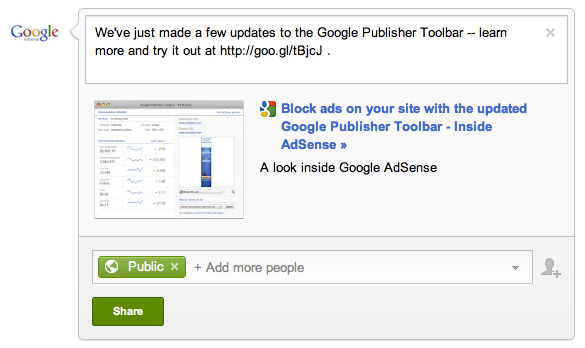
    To post a link to an article or page of your site, you may currently be using the ‘Attach link’ option on your +page and pasting in the URL of the article. When you post this way, a small thumbnail of an image from that article will appear next to a text preview, or a relevant icon. You then have the option to post additional comments above the content before you share it.

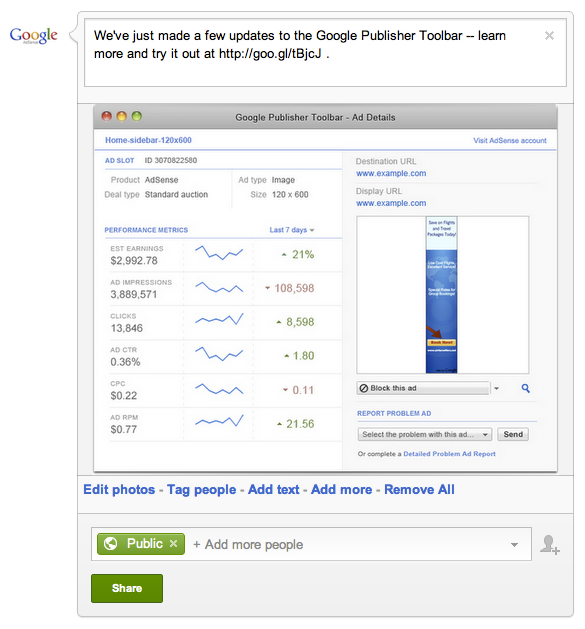
    From time to time, instead of simply attaching the link, try posting the image from the article as the main content on your +page. Then, in the comment field above, enter the description with a shortened link to the full content. This allows users to see a larger version of the image from the article and can draw them in, while the shortened link above the image directs them to the article on your site for the full content.

    Here’s a side-by-side comparison of how these two approaches would look while drafting a post for your +page:

    Link as attachment 


    Image as attachment 

    Give this technique a try for some of your posts, and see how it can help you build a richer experience on your +page. Have you found success with posting images, or do you have other tips for +pages to share? Leave a comment on our AdSense +page and discuss your experiences with other publishers.

    Tune in again next week, when we’ll discuss verifying your +page. In the meantime, feel free to head over to our AdSense +page to share your thoughts about today’s content with other readers.

    Posted by Arlene Lee - Inside AdSense Team

    Social Fridays: Create a Google+ page to connect with users

    Welcome back to our Social Fridays series, where we’re providing tips for getting set up optimally on Google+ each week. Last week, we shared best practices around placing +1 buttons on your site and tracking their performance. Today, we’ll move on to creating a Google+ page for your site.

    A Google+ page is the hub of your site’s identity on Google, and offers a number of tools to help you reach audiences in new ways. On your +page, you can share your articles, photos, YouTube videos, and even host live broadcasts. Your +page will also include a +1 button that users can click to recommend you. Think about your Google+ page as a way to complement your site, allowing you to grow and measure user engagement before directing users back to your pages for more of your great content. Creating a Google+ page is simple and takes just minutes.


    Once you’ve set up your own +page, be sure to set up a content pipeline and post regularly.
    One great way to engage with users via your +page is to host regular Google+ Hangouts. Hangouts are free, multi-person video chat sessions for up to 10 people that can help you get closer to your users, no matter where in the world you’re located. We all know that talking face-to-face can convey much more than simply typing messages -- so consider hosting classes via Hangout if you run a hobby-related site, or invite loyal readers to discuss recent content you’ve published.

    You also have the option of broadcasting your hangout to the world via Hangouts on Air. Up to 10 people can still actively participate, but anyone can tune in to watch via live streaming on your Google +page, your YouTube channel, or even your own site. Every Hangout on Air will be automatically recorded and saved to your YouTube channel, so you can edit and share the content afterwards. Whether you want to interview an expert, give a behind-the-scenes tour of your business, or just share your content live in front of a global audience, Hangouts on Air allow you to connect with your users in a new way.


    To create a Google+ page for your site and get started with Hangouts, sign in to your personal profile on Google+ and then follow the simple instructions. You’ll be able to enter details about your site and upload a profile photo so your users will be able to recognize you. For more information about getting started with +pages, visit the Google+ Help Center.

    Feel free to share feedback about this post and your experience with using Hangouts on our AdSense +page. Then, join us here next week for our next Social Friday post -- we’ll share a little-known best practice for posting to your +page that can help increase engagement with your users.

    Posted by Arlene Lee - Inside AdSense Team

    Ads