Getting to work on diversity at Google

We’ve always been reluctant to publish numbers about the diversity of our workforce at Google. We now realize we were wrong, and that it’s time to be candid about the issues. Put simply, Google is not where we want to be when it comes to diversity, and it’s hard to address these kinds of challenges if you’re not prepared to discuss them openly, and with the facts. So, here are our numbers:
There are lots of reasons why technology companies like Google struggle to recruit and retain women and minorities. For example, women earn roughly 18 percent of all computer science degrees in the United States. Blacks and Hispanics make up under 10 percent of U.S. college grads and collect fewer than 5 percent of degrees in CS majors, respectively. So we’ve invested a lot of time and energy in education.

Among other things, since 2010 we’ve given more than $40 million to organizations working to bring computer science education to women and girls. And we’ve been working with historically black colleges and universities to elevate coursework and attendance in computer science. For example, this year Google engineer Charles Pratt was in-residence at Howard University, where he revamped the school’s Intro to CS curriculum.

But we’re the first to admit that Google is miles from where we want to be—and that being totally clear about the extent of the problem is a really important part of the solution. To learn more about our work on diversity—for our our workforce, for the web and for the tech leaders of the future—visit google.com/diversity.

Better data centers through machine learning

It’s no secret that we’re obsessed with saving energy. For over a decade we’ve been designing and building data centers that use half the energy of a typical data center, and we’re always looking for ways to reduce our energy use even further. In our pursuit of extreme efficiency, we’ve hit upon a new tool: machine learning. Today we’re releasing a white paper (PDF) on how we’re using neural networks to optimize data center operations and drive our energy use to new lows.

It all started as a 20 percent project, a Google tradition of carving out time for work that falls outside of one’s official job description. Jim Gao, an engineer on our data center team, is well-acquainted with the operational data we gather daily in the course of running our data centers. We calculate PUE, a measure of energy efficiency, every 30 seconds, and we’re constantly tracking things like total IT load (the amount of energy our servers and networking equipment are using at any time), outside air temperature (which affects how our cooling towers work) and the levels at which we set our mechanical and cooling equipment. Being a smart guy—our affectionate nickname for him is “Boy Genius”—Jim realized that we could be doing more with this data. He studied up on machine learning and started building models to predict—and improve—data center performance.
The mechanical plant at our facility in The Dalles, Ore. The data center team is constantly tracking the performance of the heat exchangers and other mechanical equipment pictured here.

What Jim designed works a lot like other examples of machine learning, like speech recognition: a computer analyzes large amounts of data to recognize patterns and “learn” from them. In a dynamic environment like a data center, it can be difficult for humans to see how all of the variables—IT load, outside air temperature, etc.—interact with each other. One thing computers are good at is seeing the underlying story in the data, so Jim took the information we gather in the course of our daily operations and ran it through a model to help make sense of complex interactions that his team—being mere mortals—may not otherwise have noticed.
A simplified version of what the models do: take a bunch of data, find the hidden interactions, then provide recommendations that optimize for energy efficiency.

After some trial and error, Jim’s models are now 99.6 percent accurate in predicting PUE. This means he can use the models to come up with new ways to squeeze more efficiency out of our operations. For example, a couple months ago we had to take some servers offline for a few days—which would normally make that data center less energy efficient. But we were able to use Jim’s models to change our cooling setup temporarily—reducing the impact of the change on our PUE for that time period. Small tweaks like this, on an ongoing basis, add up to significant savings in both energy and money.

The models can predict PUE with 99.6 percent accuracy.

By pushing the boundaries of data center operations, Jim and his team have opened up a new world of opportunities to improve data center performance and reduce energy consumption. He lays out his approach in the white paper, so other data center operators that dabble in machine learning (or who have a resident genius around who wants to figure it out) can give it a try as well.

Just press go: designing a self-driving vehicle

Ever since we started the Google self-driving car project, we’ve been working toward the goal of vehicles that can shoulder the entire burden of driving. Just imagine: You can take a trip downtown at lunchtime without a 20-minute buffer to find parking. Seniors can keep their freedom even if they can’t keep their car keys. And drunk and distracted driving? History.

We’re now exploring what fully self-driving vehicles would look like by building some prototypes; they’ll be designed to operate safely and autonomously without requiring human intervention. They won’t have a steering wheel, accelerator pedal, or brake pedal… because they don’t need them. Our software and sensors do all the work. The vehicles will be very basic—we want to learn from them and adapt them as quickly as possible—but they will take you where you want to go at the push of a button. And that's an important step toward improving road safety and transforming mobility for millions of people.

It was inspiring to start with a blank sheet of paper and ask, “What should be different about this kind of vehicle?” We started with the most important thing: safety. They have sensors that remove blind spots, and they can detect objects out to a distance of more than two football fields in all directions, which is especially helpful on busy streets with lots of intersections. And we’ve capped the speed of these first vehicles at 25 mph. On the inside, we’ve designed for learning, not luxury, so we’re light on creature comforts, but we’ll have two seats (with seatbelts), a space for passengers’ belongings, buttons to start and stop, and a screen that shows the route—and that’s about it.
A very early version of our prototype vehicle, and an artistic rendering of our vehicle

We’re planning to build about a hundred prototype vehicles, and later this summer, our safety drivers will start testing early versions of these vehicles that have manual controls. If all goes well, we’d like to run a small pilot program here in California in the next couple of years. We’re going to learn a lot from this experience, and if the technology develops as we hope, we’ll work with partners to bring this technology into the world safely.

If you’d like to follow updates about the project and share your thoughts, please join us on our new Google+ page. We’re looking forward to learning more about what passengers want in a vehicle where their number one job is to kick back, relax, and enjoy the ride.

Through the Google lens: search trends May 16-22

This week people searched to learn more about unfamiliar faces and rising stars—on TV, courtside and even on our homepage.

Winner winner, TV dinner
People gave their “w” and “o” keys a workout this week as they turned to search to ask “who won…” in the season finales of reality show competitions “American Idol,” “The Voice” and “Dancing with the Stars.” After Josh Kaufman won "The Voice," many searched to watch some of Kaufman’s past performances on the show, like [stay with me]. Meanwhile on “Dancing with the Stars,” searches for ice dancer [meryl davis] were almost as high this past week as in February, when she won an Olympic medal in Sochi. Fans of Davis looked to find out if she’s dating her “DWTS” partner Maksim Chmerkovskiy: searches for terms like [meryl davis maksim] and [meryl davis boyfriend] have been trending.

Basketball’s surprise star
NBA fans met a fresh face this week at the NBA Draft Lottery. The designated representative of the Milwaukee Bucks was Mallory Edens, the daughter of the team’s new co-owner. And, even though the Bucks slid to the #2 pick (after having the best odds to land #1), it seems Mallory pretty much won the Lottery anyway. And she wasn’t the only one who became an overnight sensation at the NBA’s annual festival of ping pong balls and sealed envelopes: searchers also looked for information about [anjali ranadive], the daughter of the Sacramento Kings’ owner, who was also at the draft.

In other sporting news, the [preakness 2014] raced to the top of the Google charts last weekend with more than 1 million searches, as Kentucky Derby-winning California Chrome won the second of three races on the way to the coveted Triple Crown. Looking ahead to the Belmont Stakes, fans are searching for [california chrome belmont] and [california chrome odds].

Inventions and discoveries
The subjects of not one but two Google doodles were on people’s minds this week. On Monday, we celebrated the 40th anniversary of the Rubik’s Cube with an interactive, 3D doodle. Presumably after killing a few minutes (or hours) of their workdays trying to solve the vexing puzzle, people searched to learn [how to solve the rubik’s cube] as well as [rubik’s cube record]. Then searchers looked for information on [mary anning], the paleontologist who was depicted uncovering a plesiosaur skeleton on our homepage on Wednesday. It’s fitting that Anning’s birthday celebration happened this week, since dinosaurs were already trending, thanks to the discovery of a new [titanosaur] dinosaur thought to be the biggest ever discovered.


Posted by Emily Wood, Google Blog Editor, who searched this week for [rei compression sack] and [smokestack sf]

Bright ideas for an even better Bay Area

Local nonprofit heroes are making a difference in our community, and we want to do more to support them. As part of that mission, we recently launched a Bay Area Impact Challenge with a question: working together, what can we do to make the Bay Area an even better place to live?

Provide training and job opportunities for people with disabilities. Match surplus medical supplies with community clinics. Bring mobile showers and toilets to the homeless. These are just a few of the nearly 1,000 thoughtful and creative proposals we received.

A panel of community advisors—Honorable Aida Alvarez, Secretary Norman Mineta, Chief Teresa Deloach Reed, Reverend Cecil Williams and Barry Zito—joined Googlers to narrow down the pool to the 10 top finalists. Each project was selected for its community impact, ingenuity, scalability and feasibility.

Now we need your help deciding which projects to support. Which one do you think will make the biggest impact in our community? Vote now for the four ideas that inspire you.

Your votes will decide which projects get up and running in a big way—with $500,000 going to each of the top four projects, and $250,000 to the next six. An additional 15 nonprofits that entered the Challenge have already received $100,000 each in support of their work.


Cast your vote by 11:59 p.m. PST on June 2, and join us in celebrating the community spirit that makes the Bay Area a great place to call home.

Android for all and the new Nexus 5

Just in time for Halloween, we have two new treats for Android fans. First, we're excited to unwrap our latest platform release, KitKat, which delivers a smarter, more immersive Android experience to even more people. And second, we're introducing Nexus 5—a new Nexus phone developed with LG.

The first thing you’ll notice about KitKat is we’ve made the experience much more engaging: the book you're reading, the game you're playing, or the movie you're watching—now all of these take center stage with the new immersive mode, which automatically hides everything except what you really want to see.

Bringing more Google smarts to Android
Behind the polish on the screen is the power under the hood. Take the Phone app, which for most people hasn’t really changed since the days of flip phones. Now, we’re making calling easier than ever, by helping you search across your contacts, nearby places, or even Google Apps accounts (like your company’s directory), directly from within the app. And with the new Hangouts app, all of your SMS and MMS messages are together in the same place, alongside your other conversations and video calls, so you’ll never miss a message no matter how your friends send it. This is just a small taste of KitKat—learn more on our site.

Google has always focused on helping users get immediate access to the information they need, and we want to bring this same convenience and power to users on Android. With the new Nexus 5 launcher, Google smarts are deeply integrated into the phone you carry around with you, so getting to the information you need is simple, easy and fast. Swipe once from the home screen to get Google Now literally at your fingertips. Put Google to work for you by saying “OK, Google” to launch voice search, send a text, get directions or even play a song you want to hear. And in the coming weeks, we’re enhancing Now with important new card types that bring you information about contextual topics that interest you such as updates from a favorite website or blog.

Reaching the next 1 billion users
Building a platform that makes mobile phones accessible for everyone has always been at the heart of Android. Until now, some lower-end Android phones couldn't benefit from more recent Android releases due to memory constraints. With KitKat, we've slimmed down Android’s memory footprint by doing things like removing unnecessary background services and reducing the memory consumption of features that you use all the time. We did this not only within Android but across Google services like Chrome and YouTube. RAM (or memory) is one of the most expensive parts of a phone, and now Android can run comfortably on the 512MB of RAM devices that are popular in much of the world, bringing the latest goodies in Android 4.4 within reach for the next billion smartphone users.

Introducing Nexus 5
Along with our sweet naming tradition, we also introduce a new device with each platform release to showcase the latest Android innovations. For KitKat, we partnered with LG to develop Nexus 5 -- the slimmest and fastest Nexus phone ever made. Its design is simple and refined to showcase the 5” Full HD display. Nexus 5 also keeps you connected at blazing speeds with 4G/LTE and ultra fast wifi. The advanced new lens on Nexus 5 captures more light for brighter night and sharper action shots. And with optical image stabilization, you no longer have to worry about shaky hands and blurry pictures. A new HDR+ mode automatically snaps a rapid burst of photos and combines them to give you the best possible single shot. Learn more on our site.

Nexus 5 is available today, unlocked and without a contract, on Google Play in the U.S., Canada, U.K., Australia, France, Germany, Spain, Italy, Japan and Korea (and coming soon to India), starting at $349. Just in the time for the holidays, Nexus 5 will be available soon at the following retailers: Sprint, T-Mobile, Amazon, Best Buy and RadioShack.

Android 4.4, KitKat, which comes on Nexus 5, will also soon be available on Nexus 4, 7, 10, the Samsung Galaxy S4 and HTC One Google Play edition devices in the coming weeks.

How’s that for a treat?

How not to get tricked: Your favorite online safety tips

Whether it’s defending yourself from identity thieves or removing bad software from your family’s computer, it’s important to know how to stay safe online. Over the course of the past few months, we’ve explored the simple steps you can take to help keep yourself, your family and the web safer. And in celebration of October's National Cyber Security Awareness Month, for the past 30 days we’ve posted a daily tip on how to #staysafe online.


Even though our favorite month of the year is about to end, it’s good to know how to stay safe all year round. Here are the top five most popular tips from the month:

Security and privacy are important and Google provides tools to help you protect yourself and your information. For example, 2-Step Verification adds another layer of security to your Google Account. Google+ Circles and YouTube settings help you control what you share and keep your information private if you want to keep it to yourself. Verify Apps helps protect your phone from malware, and Android Device Manager will ring your phone and locate it on a map to help you find your device if you lose it (and remotely delete your information from the device if you can’t get it back).

For more information on how to stay safe and improve your online security and privacy, visit our Good to Know site, which has more information and details about Google’s tools and helpful advice on staying safe.

Google+ Hangouts and Photos: save some time, share your story

We could all use more time for ourselves, and less time figuring out technology. So today's improvements to Google+ Hangouts and Photos aim to take a lot of the work out of messaging, video calling and photo editing.

Hangouts

Hangouts enable conversations among close friends, as well as broadcasts with the entire world. Today we're improving both:
  • Hangouts for Android now supports location sharing and SMS. This way you can send a map of your current location (vs. finding and typing an address), and you can send and receive SMS (vs. switching between apps). Animated GIFs also play inline.
  • Broadcasters can now schedule Hangouts On Air, then promote them with a dedicated watch page. Once you're live, Control Room lets you moderate the conversation with eject and remote mute.
  • In both cases, the video calling experience is significantly improved. It's now full screen across mobile and desktop, and it fixes and enhances webcam lighting automatically.

From left to right: location sharing; SMS support; and animated GIFs

From left to right: schedule your Hangout On Air; promote it with a dedicated watch page; and moderate the conversation with Control Room

From left to right: video call before lighting fixes; video call after lighting fixes

The Android app and video calling features will be available in a few days, while the On Air improvements will roll out over the next few weeks.

Photos and videos

Photos and videos capture life's most precious moments, but it’s way too hard to save, organize, edit and share your stuff. Google+ can make things easier, automatically.
  • For starters, full size backups and background sync are coming soon to Google+ for iOS. This way you can backup your photos as you take them.
  • In addition, finding your photos is actually fun. We now recognize over a thousand different objects—from sunsets to snowmen—so you can just type what you’re looking for, and find matching items in your library.
  • Auto Enhance improves each photo you add to Google+, and now you can now dial the enhancements up or down. If you’re already processing your images elsewhere, you can choose to exempt an album entirely.
  • If you like to edit on the go, then you’ll enjoy Snapseed and its new HDR Scape filter. While high dynamic range (HDR) imaging requires multiple photos to create its effect, HDR Scape can deliver similar results with a single tap.
  • We’re also adding Analog Efex Pro to the Nik Collection (still just $149). With it you can reimagine your images using classic cameras and processing methods—from toy and medium format to wet plate and vintage.

From left to right: photo searches for "beach", "sunset" and "snow"

From left to right: original image; Auto Enhance at "normal"; Auto Enhance at "high"

From left to right: original image; image enhanced with Snapseed HDR Scape

Auto Awesome can help bring your story to life in creative ways. Today we’re adding three new techniques:
  • Action. Maybe it’s your child’s first gymnastic meet, or you’re skateboarding with a friend. Action can take their tumble or half pipe trick, and create a strobe-effect photograph.
  • Eraser. When you’re taking pictures of landmarks, people and cars often get in the way. Eraser can take a sequence of these photos, and erase whatever’s moving to give you a “cleaner” image.
  • Movie. Movie produces highlight reels from your photos and videos—complete with effects, transitions and a soundtrack—automatically. You can share the movie as is, or dive into the editing process to customize even further.
From left to right: sequence of action shots; Auto Awesome Action

From left to right: sequence of images with people in the way; Auto Awesome Eraser


All of today’s photo and video improvements will be available this week. Auto Awesome Movie works on certain devices with Android 4.3+, but all the other app features are widely supported.

With 540 million people active across Google each month, 300 million people active in just the stream and more than 1.5 billion photos uploaded every week, the Google+ community is growing faster than we ever could have imagined. Today’s updates are our way of saying “thank you”—we hope they save you time, and help you share your story.

New AdSense Data in the Core Reporting API

Google AdSense is a free, simple way for website publishers to earn money by displaying targeted Google ads on their websites. Today, we’ve added the ability to access AdSense data from the Google Analytics Core Reporting API. The AdSense and Analytics integration allows publishers to gain richer data and insights, leading to better optimized ad space and a higher return on investment.

In the past, accessing AdSense data using the Analytics Core Reporting API has been a top feature request. We’ve now added 8 new AdSense metrics to the Analytics Core Reporting API, enabling publishers to streamline their analysis.

Answering Business Questions
You can now answer the following business questions using these API queries:

Which pages on your site contribute most to your AdSense revenue?


dimensions=ga:pagePath
&metrics=ga:adsenseCTR,ga:adsenseRevenue,ga:adsenseECPM &sort=-ga:adsenseRevenue

Which pages generate a high number of pageviews but aren't monetizing as well as other pages?
dimensions=ga:pagePath
&metrics=ga:pageviews,ga:adsenseCTR
&sort=-ga:pageviews

Which traffic sources contribute to your revenue?
dimensions=ga:sourceMedium
&metrics=ga:adsenseCTR,ga:adsenseRevenue,ga:adsenseECPM
&sort=-ga:adsenseRevenue

Reporting Automation
By accessing this data through the API, you can now automate reporting and spend more time doing analysis. You can also use the API to integrate data from multiple sites into a single dashboard, build corporate dashboards to share across the team, and use the API to integrate data into CRM tools that display AdSense Ads.

Getting Started
To learn more about the new AdSense data, take a look at our Google Analytics Dimensions and Metrics Explorer. You can also test the API with your data by building queries in the Google Analytics Query Explorer.

Busy? In that case, now’s a great time to try these Analytics API productivity tools:
  • Magic Script: A Google Spreadsheets script to automate importing Analytics data into Spreadsheets, allowing for easy data manipulation. No coding required!
  • Google Analytics superProxy: An App Engine application that reduces all the complexity of authorization.

We hope this new data will be useful, and we're looking forward to seeing what new reports developers build.

Posted by Nick Mihailovksi, Product Manager, Google Analytics API Team

Get your multi device strategy off the ground

As tech-savvy consumers, we’ve all contributed to the growth in online traffic coming from mobile and tablet platforms, and as publishers you've likely heard the importance of adapting a multi-device approach to cater for this growing trend. But exactly how important is it? How do you develop a multi-device strategy? And how does all of this equate to increased revenues for you? 

Over the coming weeks, we’ll run a series of posts that aim to answer exactly that. We’ll explore building mobile solution options to suit you, and also explain how you can use AdSense to monetize your mobile sites or AdMob.

Where are your users coming from?
We're living in a multi-screen world where users expect to have access to information, people, and computing power from any screen. Here are just a few findings from a recent survey*:
  • 81% of consumers use their smartphones while also watching TV
  • 66% use their smartphone at the same time as their laptop
  • 83% of mobile users said that they wouldn’t leave home without their smartphone
  • 63% of users said that while they may not make their final purchase through a mobile, they would definitely use their phone to gather info and help them with their purchasing decision. 
To see how these shifts in consumer behavior are relevant to your site, check the Platforms report in your AdSense account. It’s a good idea to pull a comparison report and track the growth in your percentage of mobile and tablet users over the past quarter or year. Chances are, you’re going to see a shift away from desktop with more of your online content being reached via tablet and mobile. If your site isn’t designed to cater for this growing market then now is the time to start building your multi-device strategy. And we’re here to make you aware of some of the options open to you! Join us next week when we’ll be covering a range of mobile solutions to help you discover the right one for your business.

If you’d like to learn more about what we’ve discussed today, you can also check out a recording of our recent Hangout, “Mobile - The Time is Now”.

*Study completed by Google in collaboration with Sterling Brands and Ipsos, on a sample of 1,600 users, (2012).

Posted by Federico Gomez Kodela - Mobile Specialist
Was this blog post useful? Share your feedback with us.

An Easy Way to Upgrade to Universal Analytics

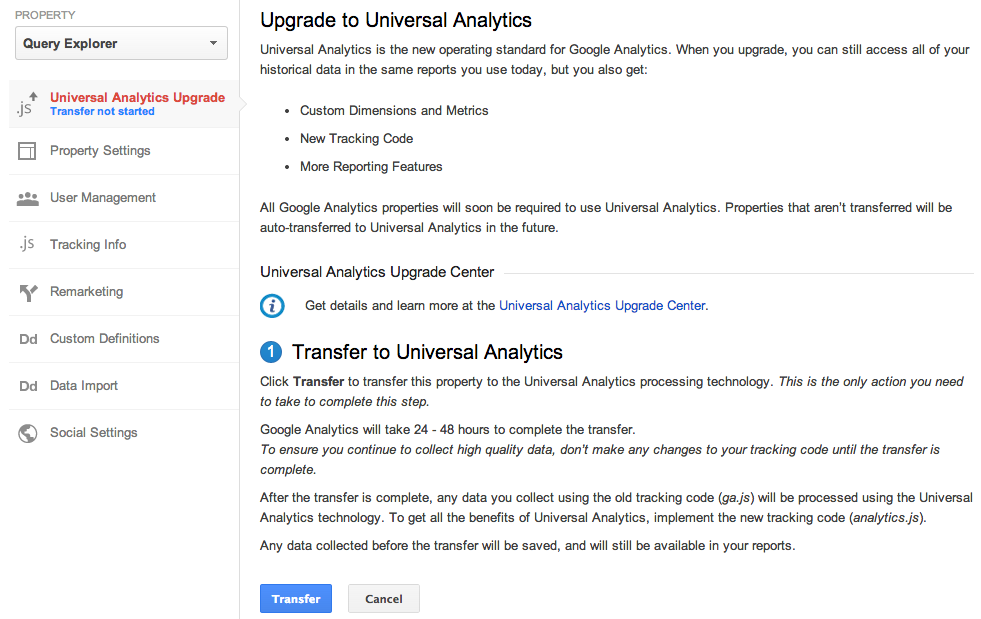
Last year we launched Universal Analytics, a new technology that allows you to measure customer interactions across platforms and devices. As we announced at the 2013 Google Analytics Summit, we’ve been working on a solution to help you upgrade your existing properties to the new infrastructure without losing any historical data.

Today, we’re announcing the Universal Analytics Upgrade Center, an easy, two-step process to upgrade your existing properties from classic Google Analytics to Universal Analytics.

Once you complete the upgrade process, you can continue to access all of your historical data, plus get all the benefits of Universal Analytics including custom dimensions and metrics, a simplified version of the tracking code, and better cross-domain and cross-device tracking support.

Getting Started

You can upgrade your classic Google Analytics properties into Universal Analytics properties by following these two steps:

Step 1: Transfer your property from Classic to Universal Analytics.
We’ve developed a new tool to transfer your properties to Universal Analytics that we will be slowly enabling in the admin section of all accounts. In the coming weeks, look for it in your property settings.


Step 2: Re-tag with a version of the Universal Analytics tracking code.
After completing Step 1, you’ll be able to upgrade your tracking code, too. Use the analytics.js JavaScript library on your websites, and Android or iOS SDK v2.x or higher for your mobile apps.

Universal Analytics Auto-Transfer

Our goal is to enable Universal Analytics for all Google Analytics properties. Soon all Google Analytics updates and new features will be built on top of the Universal Analytics infrastructure. To make sure all properties upgrade, Classic Analytics properties that don’t initiate a transfer will be auto-transferred to Universal Analytics in the coming months.

Upgrade Resources

To answer common questions, we’ve put together the Universal Analytics Upgrade Center, a comprehensive guide to the entire upgrade plan. This guide includes an overview of the process, technical references for developers, and a project timeline with phases of the overall upgrade.

We’ve also included FAQs in the Upgrade Center, but if you need more information, you can also visit the new Universal Analytics Google Group to search for answers and ask more specific questions.

We’re excited to offer you this opportunity to upgrade, and hope you take advantage of the resources we’ve created to guide you through the process. Visit the Universal Analytics Upgrade Google Group to share your comments and feedback. We’d love to hear what you have to say!

Posted By Nick Mihailovski, on behalf of the Google Analytics Team

Improving Ad Rank to show more relevant ad extensions and formats

When people use Google to research and buy things, they're interested in the most relevant and useful results. Ad extensions help by providing more information to potential customers and additional ways for them to respond. For example, they can call your business number, see your business location on a map, or choose an even more relevant landing page that you're promoting with sitelinks. Ad extensions typically improve clickthrough rate and overall campaign performance because they make ads more useful.

Today, we're announcing improvements in the AdWords auction that let us more consistently show more relevant ad extensions and formats.

Ad Rank improvements

Our system for ordering ads on search results pages uses a calculation called Ad Rank. Previously, Ad Rank was calculated using your max CPC bid and your Quality Score. With this update, Ad Rank will also take into account a third component: the expected impact from your ad extensions and formats. In addition, we've increased the importance of Ad Rank in determining whether your ad is eligible to be displayed with extensions and formats.

Here are some more details and implications of these changes:

  • Ad extensions and formats can now influence the position of your ad on the search results page. If two competing ads have the same bid and quality, then the ad with the more positive expected impact from extensions will generally appear in a higher position than the other.
  • When estimating the expected impact of extensions and ad formats, we consider such factors as the relevance, clickthrough rates, and the prominence of the extensions or formats on the search results page.
  • Because Ad Rank is now more important in determining whether your ad is shown with extensions and formats, you might need to increase your Quality Score, bid, or both for extensions and formats to appear. 
  • In each auction, we'll generally show your highest performing and most useful combination of extensions and formats among those eligible. So there's no need to try to guess which extensions will help improve your clickthrough rate the most. 
  • You may see lower or higher average CPCs in your account. You may see lower CPCs if your extensions and formats are highly relevant, and we expect a large positive performance impact relative to other competitors in the auction. In other cases, you may see higher CPCs because of an improvement in ad position or increased competition from other ads with a high expected impact from formats.
  • For now, this update only affects search ads appearing on Google Search.

We've updated our Help Center articles on topics including ad extensions and how we rank ads to reflect these important changes.

Recommendations for using extensions

Extensions make your ads more useful and can improve your campaign performance. So you should add extensions that make sense for your business type and campaign goals. With these improvements to AdRank, our systems will do even more to automatically serve extensions in the contexts when they're most beneficial.

For example, consider someone downtown searching on a mobile phone for "auto repair." In this example, the user might be most likely to respond to your ad when they can click to call a phone number or tap a link to get directions to visit in person. So we may show a combination of call and location extensions with your mobile search ad.

Now imagine if someone were searching for "auto repair" on a laptop computer in the suburbs. Say your ad earned the 3rd ad position above the organic results in this auction. We might show your seller rating and sitelinks because that's the highest performing and most useful combination of extensions that could be shown with your ad in this particular auction and ad position.

We're always looking for ways to make ads more relevant to a user's intent and context. After months of testing, we're confident that these AdRank changes help achieve that goal by more consistently showing people the most useful combination of extensions and formats.

Posted by Chris Roat, Staff Software Engineer

Introducing Shopping campaigns: a better way to promote your products on Google

Everyday, people search on Google for the best products from retailers large and small. With Product Listing Ads (PLA) on Google Shopping, people can browse a wide selection of products, finding high-quality imagery and relevant product information like brand and price.

To make it easier for you to connect with these consumers and promote your products on Google, we’re introducing Shopping campaigns, a new campaign type for PLAs. Shopping campaigns streamline how you manage and bid on your products, report on your performance, and find opportunities to grow your traffic from Google.
Key benefits

1. Retail-centric way to manage your products

Shopping campaigns allow you to browse your product inventory directly in AdWords and create product groups for the items you want to bid on. For example, if you’re a fashion retailer, you’ll see what types of shoes are in your data feed and how many boots you can promote. You use the product attributes derived from your data feed such as Google product category, product type, brand, condition, item id and custom labels to organize your inventory into product groups. Custom labels are a new, structured way to tag your products in your data feed with attributes that matter to you, such as ‘margin’ to separate your high- and low-margin products. To see all the items you can bid on, the Products tab will show you a full list of your approved products and their product attributes.
2. Advanced reporting to measure product performance

Regardless of how you choose to structure your product groups, Shopping campaigns offer the unprecedented ability to view your performance data by product or product attribute. Since performance metrics are associated with the item and not the product group, you can filter and segment data by your product attributes. This includes Google product category, product type, brand, condition, item id and custom labels. For example, you’ll see which Apparel & Accessories categories drive the most clicks, without having to break out your clothing category into a separate product group.
3. Competitive data to size your opportunity

To help you optimize and scale your PLAs, Shopping campaigns provide insights into your competitive landscape. In the Product Groups tab, you can add benchmark columns to see the estimated average CTR and Max CPC for other advertisers with similar products. The competitive performance data you see is aggregated and averaged, so all performance data is anonymous. Coming soon, you’ll have impression share columns to help you understand the opportunity lost due to insufficient bids and budgets, and a bid simulator will help you estimate the amount of impressions you’ll receive as you adjust your bids.
How to get started

Shopping campaigns are currently available to a limited number of advertisers. It will be rolling out gradually in the US, with full global availability by early next year. API support will come in 2014 as well.

You can learn more about Shopping campaigns at some upcoming events. Join us at our Learn With Google webinar for Shopping campaigns on November 20, 2013, and find us at Search Engine Strategies in Chicago on November 6, 2013.

We've built Shopping campaigns with retailers in mind, and if you'd like to be an early adopter to share your feedback, you can express your interest here. We'd love to hear from you!

Posted by Sameer Samat, Vice President of Product Management, Google Shopping

Handwriting input comes to Gmail and Google Docs

(Cross-posted on the Gmail blog)

Gmail and Docs offer wide language support, however in some cases using the keyboard is less than ideal. Whether you’re a student trying to include a foreign phrase in your paper or an international consultant hoping to begin your message with a friendly local greeting, now you’ll be able to use your own handwriting to input words directly into Gmail and Google Docs with your mouse or trackpad. To try it out, enable input tools in Gmail or Docs and select the handwriting input (represented by a pencil icon) of the language you want to use.
       
You can write single or even multiple characters at once in the panel to see them show up in your message or document. Currently, handwriting input is available in Google Docs for over 20 languages and in Gmail for over 50 languages, including Chinese, Japanese, Hindi and Russian.
Handwriting input makes the internet easier to use by people worldwide and is also part of a larger effort to break the barrier between languages, check it out in Google Mobile Search, Google Translate (Web, Android and iOS), and the Chrome browser.

Calling All Music Fans: YouTube Music Award Voting Opens Today

What do waking up, paper planes, hives, goblins, and five people on one guitar have in common? On November 3, Avicii, M.I.A., Earl Sweatshirt, Tyler the Creator, and Walk Off the Earth will all perform live at the first-ever YouTube Music Awards, joining a top musical lineup at Pier 36 in New York City. Actor and musician Jason Schwartzman is joined by comedian and musician Reggie Watts to host this live event. Music video visionary Spike Jonze is creative director, with executive producers VICE Media and Sunset Lane Entertainment.

And now it’s your turn. YouTube Award Nominations across six categories have just been announced at youtube.com/musicawards. Starting today, you can go there or search “YTMA” on YouTube to vote on the nominees by sharing the official YouTube Music Awards nomination videos across Google+, Twitter and Facebook. These video and artist nominations are based on YOUR views, likes, comments and subscriptions over the last 12 months from September 2012, and your votes from today will determine the winners.

The six nomination categories and nominees for this year’s YouTube Music Awards are:

Video of the Year: Honoring the world’s most loved music videos, these nominees represent the videos with the most fan engagement on YouTube over the last year.


  • Demi Lovato - Heart Attack
  • Epic Rap Battles of History - Barack Obama vs Mitt Romney
  • Girls' Generation - I Got A Boy
  • Justin Bieber (feat. Nicki Minaj) - Beauty And A Beat
  • Lady Gaga - Applause
  • Macklemore & Ryan Lewis (feat. Mary Lambert) - Same Love
  • Miley Cyrus - We Can't Stop
  • One Direction - Best Song Ever
  • PSY - Gentleman
  • Selena Gomez - Come & Get It


Artist of the Year: Honoring the acts YouTube fans have made stars, nominees represent the most watched, shared, liked, and subscribed-to artists on YouTube.

  • Eminem
  • Epic Rap Battles of History
  • Justin Bieber
  • Katy Perry
  • Macklemore & Ryan Lewis
  • Nicki Minaj
  • One Direction
  • PSY
  • Rihanna
  • Taylor Swift


Response of the Year: Honoring the best fan remix, parody or response video, these nominees represent the top “unofficial” fan videos on YouTube based on your views, shares and other activity.

  • Boyce Avenue (feat. Fifth Harmony) - Mirrors
  • Jayesslee - Gangnam Style
  • Lindsey Stirling and Pentatonix - Radioactive
  • ThePianoGuys - Titanium / Pavane
  • Walk Off the Earth (feat. KRNFX) - I Knew You Were Trouble


YouTube Phenomenon: Recognizing the YouTube trends the world could not escape from, nominees are based on the phenomena that generated the most fan videos.

  • Diamonds
  • Gangnam Style

  • Harlem Shake
  • I Knew You Were Trouble
  • Thrift Shop


YouTube Breakthrough: Honoring the music world’s breakout new acts, nominees represent the artists who experienced the biggest growth in views and subscribers.

  • Kendrick Lamar
  • Macklemore & Ryan Lewis
  • Naughty Boy
  • Passenger
  • Rudimental


Innovation of the Year: Starting with videos selected by an international panel of musicians, YouTubers and creative luminaries, we then selected the creative video innovations that resonated most with fans on YouTube, based on views, likes, shares and comments.

  • Anamanaguchi - ENDLESS FANTASY
  • Atoms For Peace - Ingenue
  • Bat For Lashes - Lilies
  • DeStorm - See Me Standing
  • Toro Y Moi "Say That"


In the run up to the YouTube Music Awards, five music events will be streamed from around the world on YouTube, culminating in the live awards celebration at Pier 36 in New York City. The shows from Seoul, Tokyo, Moscow, London and Rio will kick off at 5 a.m. ET on November 3, and fans can tune in at youtube.com/musicawards.

So what are you waiting for? Head over to youtube.com/musicawards to watch the nomination videos and cast your votes. Stay tuned for more information on the big show and we’ll see you on Sunday, November 3!

The YouTube Music Awards Team recently watched “Announcing the first-ever YouTube Music Awards.”

New free expression tools from Google Ideas

As long as people have expressed ideas, others have tried to silence them. Today one out of every three people lives in a society that is severely censored. Online barriers can include everything from filters that block content to targeted attacks designed to take down websites. For many people, these obstacles are more than an inconvenience—they represent full-scale repression.

This week, in partnership with the Council on Foreign Relations and the Gen Next Foundation, Google Ideas—our “think/do tank”—is hosting a summit in New York entitled “Conflict in a Connected World.”

The summit brings together “hacktivists,” security experts, entrepreneurs, dissidents and others to explore the changing nature of conflict and how online tools and can both harm and protect. We’re also assessing what might be done to better protect people confronting online censorship. With our partners, we will launch several new products and initiatives designed to help:
  • Project Shield is an initiative that enables people to use Google’s technology to better protect websites that might otherwise have been taken offline by “distributed denial of service” (DDoS) attacks. We’re currently inviting webmasters serving independent news, human rights, and elections-related content to apply to join our next round of trusted testers.
  • The Digital Attack Map is a live data visualization, built through a collaboration between Arbor Networks and Google Ideas, that maps DDoS attacks designed to take down websites—and their content—around the globe. This tool shows real-time anonymous traffic data related to these attacks on free speech, and also lets people explore historic trends and see related news reports of outages happening on a given day.
  • uProxy is a new browser extension under development that lets friends provide each other with a trusted pathway to the web, helping protect an Internet connection from filtering, surveillance or misdirection. The University of Washington and Brave New Software developed the tool, which was seeded by Google Ideas. To learn more about the challenges uProxy aims to address, watch our video.
Information technologies have transformed conflict in our connected world, and access to the free flow of information is increasingly critical. This week’s summit—as well as Shield, the Digital Attack Map and uProxy—are all steps we’re taking to help those fighting for free expression around the globe.

Learn how to evaluate the user experience on your site

With only a few seconds to capture a user’s attention, we all know it’s important to have a great user experience on your site. One of our goals is to help you create a user experience that will keep users coming back to your site.

In the past, we shared our guiding principles for user experience and asked some of our most successful publishers to share their thoughts. However, many of you told us you’d like to see more examples of how to actually apply the principles to your site. We’ve heard your feedback and, on November 1st, we’ll show you how in a Learn with Google Hangout on Air that takes you behind the scenes of a user experience consultation.

During the Hangout on Air, we’ll evaluate a pre-selected AdSense publisher’s website and teach you how to take a step back, apply a critical eye, and evaluate whether or not the user experience on your own site complements your site goals. We’ll identify specific changes the publisher can make to improve the user experience, walk through our recommendations, and answer a few of your user experience questions, which you can submit when you RSVP to watch the live stream.

RSVP to let us know if you’ll be watching the Hangout on Air and we’ll see you on November 1st!

Click here to RSVP

Posted by Laurie Shiau - Inside AdSense Team 
Was this blog post useful? Share your feedback with us.

Google Media Tools: a new intersection for newsgathering

The New York Times used Google+ Hangouts to interview U.S. Secretary of State John Kerry about Syria’s chemical weapons. The Weather Channel used Google Earth to illustrate the damage of Superstorm Sandy through dramatic before and after satellite images and live YouTube video. And Svenska Dagbladet used the Google Maps API and crowdsourced information from readers to plot disparities in neighborhood mortgage rates, generating a meaningful debate in Sweden.

These are just a handful of ways journalists around the world are already using the Internet and Google tools to report the news, visualize data and improve their storytelling capabilities. To continue helping journalists report the news in new and compelling ways, we’ve launched Google Media Tools, a centralized hub aimed at empowering journalists of all skill levels with more ways to connect with their audiences and communities.
The site—which we unveiled last week at Online News Association ‘13 (ONA), a premier digital journalism conference—features a variety of ways to do everything from research to developing to publishing. There are many tips and tricks to make technology do some of the heavy lifting in the daily lives of journalists. The site also showcases the power of the Internet overall in reaching new audiences and giving journalists more ways to make an impact.
We’ll add more resources including case studies, tutorials and expanded content in the coming months, and will soon launch the site in other languages as well.

Improvements to location targeting for international searches

The world is getting smaller. Today, people use search to shop for products and services from around the corner or across the world. This means that every business can now be a global business.

To help you connect with your customers - wherever they’re located - we’re improving the way location targeting works in AdWords. Starting the week of November 11, 2013, advertisers using either the default or ‘location of interest’ setting will be able to show ads to potential customers by taking into account both the location that people are searching for, as well as the location they are searching from -- even when they are international searches. For example, let’s say you own a hotel, and you are currently targeting Paris with the keyword “Paris hotels.” Previously, only people searching on Google.fr or Google.com from France could see your ad. Starting the week of November 11, your ads will be eligible to show to people searching for “Paris hotels” from anywhere in the world -- for example, someone who lives in New York City who is booking a vacation in Paris.

These improvements help you share your message with more customers who have expressed interest in your business and deliver a better set of results to people who are searching with locations in their intent.

Most advertisers will find that this change improves the reach of their ads with no action needed. In fact, this is currently how targeting works within countries. This update just ensures that searches across countries work in the same way. Your ads will continue to show to your target audience based on the location targeting options that you have set. In some cases you may see a change in impression volume since your ads can now show to people who are searching for your business from places where your ads weren’t previously showing.

These changes offer broader coverage for your ads while keeping your existing location options intact. If you prefer to narrow your location settings, you can still do so using advanced location options by selecting the “People in my targeted location” radio button.  You can also exclude geographic locations to prevent your ads from showing in selected regions.
People are searching in ways that transcend geographical boundaries, and we want to ensure that AdWords reflects this global reality. These location targeting updates make it easier for potential customers to find your business, and easier for you to connect with them – wherever they may be looking.

Posted by Nicholas Boos, Product Manager, AdWords

Ads